Controller Menus
The menu bar at the top of the OverMox Controller provides access to file operations, editing commands, and help resources for the node graph editor.
File Menu
Section titled “File Menu”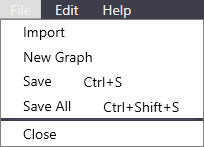
| Item | Shortcut | Description |
|---|---|---|
| Import | None | Import assets or graphs into your project |
| New Graph | None | Create a new node graph |
| Save | Ctrl + S | Save the current graph |
| Save All | Ctrl + Shift + S | Save all open graphs |
| Close | None | Close the current graph |
Edit Menu
Section titled “Edit Menu”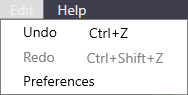
| Item | Shortcut | Description |
|---|---|---|
| Undo | Ctrl + Z | Undo the last action |
| Redo | Ctrl + Shift + Z | Redo the last undone action |
| Preferences | None | Open the Preferences window |
Help Menu
Section titled “Help Menu”| Item | Description |
|---|---|
| Shortcuts | Open the keyboard shortcuts reference window |
Related
Section titled “Related”- Preferences - Editor settings
- Keyboard Shortcuts - Full shortcuts reference
- Node Graph - Working with the visual scripting canvas