Process Management
Process nodes manage external programs on your PC from inside a graph. Use them to launch companion tools when a stream starts, close them on shutdown, or wait until an app is running before continuing.
IfProcess
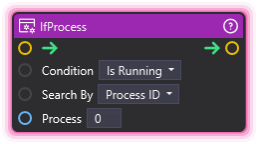
Section titled “IfProcess”💡 Simple Explanation: Conditional based on whether external program is running. Process-dependent logic.
⚙️ Technical Description: ProcessNode that checks process state by ID or name and conditionally executes based on whether the process is running.
🔍 Full Details & Examples
🔧 How It Works: Checks if process is running/not running, executes if condition met.
✨ Perfect For:
- Process-dependent automation
- Checking if tools are running
- Conditional workflows
👉 Inputs:
Search By(Dropdown) - Search by name or IDProcess(String) - Process name or IDCondition(Dropdown) - IsRunning or IsNotRunning
🎬 Streaming Example: “If OBS is not running, show warning.”
🎯 Tips: Can check by process name (e.g., “obs64”) or ID.
StartProcess
Section titled “StartProcess”💡 Simple Explanation: Starts an external program. Launches tools or scripts.
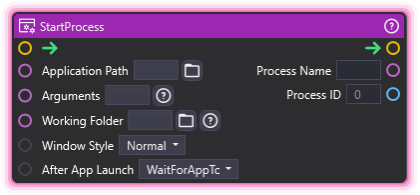
⚙️ Technical Description: ProcessNode that launches external applications or commands with specified arguments and working directory.
🔍 Full Details & Examples
🔧 How It Works: Launches executable at path with arguments.
✨ Perfect For:
- Starting helper apps
- Running scripts
- Launching tools
👉 Inputs:
Application Path(String) - Full path to executableArguments(String) - Command line argumentsWorking Folder(String) - Working directory for the processWindow Style(Dropdown) - Window display styleAfter App Launch(Dropdown) - Behavior after launching
👈 Outputs:
Process Name(String) - Name of the started process, set once it has loadedProcess ID(Integer) - ID of the started process
🎬 Streaming Example: “Launch music player when stream starts.”
🎯 Tips: Use the full path to the executable. If the process cannot be started (no path, or a file that does not exist), the node logs a warning, sets Process ID to 0 and Process Name to empty, and the flow continues.
TerminateProcess
Section titled “TerminateProcess”💡 Simple Explanation: Stops an external program. Closes tools or scripts.
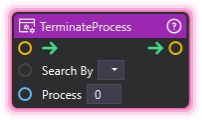
⚙️ Technical Description: ProcessNode that terminates external processes by name or ID.
🔍 Full Details & Examples
🔧 How It Works: Kills process by name or ID.
✨ Perfect For:
- Cleaning up tools
- Closing apps
- Process management
👉 Inputs:
Search By(Dropdown) - Search by name or IDProcess(String) - Process name or ID
🎬 Streaming Example: “Close music player when stream ends.”
🎯 Tips: Forcefully terminates process. Use with care.
WaitForProcess
Section titled “WaitForProcess”💡 Simple Explanation: Waits for a process to start or stop before continuing. Process-based synchronization.
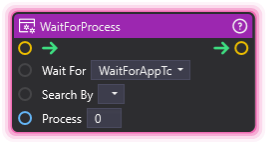
⚙️ Technical Description: ProcessNode that pauses execution until the specified process condition is satisfied (running or not running).
🔍 Full Details & Examples
🔧 How It Works: Continuously checks if the process satisfies the specified condition (running or not running) before allowing execution to continue.
✨ Perfect For:
- Waiting for external tools to launch before proceeding
- Waiting for processes to close before cleanup
- Synchronizing with external applications
👉 Inputs:
Search By(Dropdown) - Search by name or IDProcess(Integer or String) - Process ID (Integer) or process name (String), following Search ByWait For(Dropdown) - WaitForAppToLoad (the process is running) or WaitForAppToClose (it is not)
🎬 Streaming Example: “Wait for OBS to finish launching before starting scene transitions.”
🎯 Tips: The node waits with no timeout until the condition is met, so use it with care to avoid blocking your graph. A lookup that fails (a Process ID that no running process has, or no Search By selection) logs a warning, and the flow continues.