Audio Components
Audio components let you play sounds in your scenes, with support for both 2D (non-positional) and 3D (spatial) audio.
Audio Player 3D
Section titled “Audio Player 3D”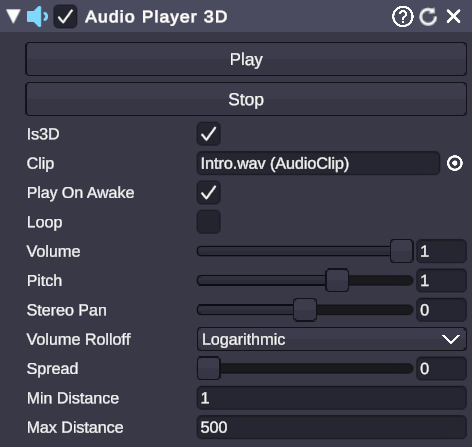
🏷️ Category: Audio
💡 Simple Explanation: Plays sound effects and music from a point in 3D space.
⚙️ Technical Description: A wrapper component for audio playback that provides simple Play/Stop controls and manages 3D spatial audio settings for positional sound.
📖 Full Details & Properties
🔧 How It Works: Audio Player 3D attaches to a scene object and plays audio from that object’s position. When Is 3D is enabled, sounds get quieter as the camera moves away and pan left/right based on position. When disabled, audio plays at full volume regardless of position (like background music).
✨ Perfect For:
- Sound effects tied to objects
- Ambient sounds from specific locations
- Music players
- Alert sounds
- Character voices
📋 Properties:
| Property | Type | Description |
|---|---|---|
| Play | Button | Start audio playback |
| Stop | Button | Stop audio playback |
| Is 3D | Boolean | Enable spatial/positional audio |
Additional properties accessible via node graphs (ComponentSetProperty):
| Property | Type | Description |
|---|---|---|
| Clip | Audio Clip | The audio file to play |
| Volume | Float | Playback volume (0 to 1) |
| Pitch | Float | Playback speed/pitch (1 = normal) |
| Loop | Boolean | Repeat audio when it ends |
| Play On Awake | Boolean | Auto-play when scene starts |
🎬 Streaming Example: “Add a celebration sound effect that plays from your mascot’s position when someone donates.”
🎯 Tips:
- Use Is 3D = false for background music and UI sounds that should play at consistent volume.
- Use Is 3D = true for environmental sounds that should feel like they come from specific locations.
- The Pitch property affects both speed and pitch - set to 2 for double speed/higher pitch, 0.5 for half speed/lower pitch.
- To change the audio clip at runtime, use the
ComponentSetPropertynode.
Related Features
Section titled “Related Features”Audio Visualizer
Section titled “Audio Visualizer”For reactive visuals that respond to audio, see the Audio Visualizer scene object, which analyzes audio input and can drive visual effects.
Node Graph Audio Nodes
Section titled “Node Graph Audio Nodes”Control audio playback programmatically:
PlaySceneObjectAudio- Play the audio attached to a scene objectDecibelLevel- Get the current volume level from an Audio Visualizer