Input
Input nodes let your graphs react to keyboard, mouse, and gamepad activity. Reach for them when you want hotkeys that fire triggers or effects that follow the cursor over the Output window.
InputListener
Section titled “InputListener”💡 Simple Explanation: Listens for keyboard/gamepad input. Triggers on key presses, holds, and releases.
⚙️ Technical Description: UpdaterNode that monitors input system events and triggers outputs for specified actions with support for button states, axis changes, modifier keys, and target values.
🔍 Full Details & Examples
🔧 How It Works: Monitors input system for specified action with event type and optional modifiers.
✨ Perfect For:
- Hotkeys
- Keyboard shortcuts
- Gamepad controls
👉 Inputs:
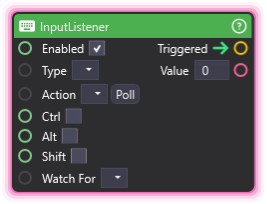
Enabled(Boolean) - Whether the listener is active (default true)Type(Dropdown) - Input type (Keyboard, Mouse, or Controller)Action(Dropdown) - Input action nameCtrl(Boolean) - Require Ctrl modifierAlt(Boolean) - Require Alt modifierShift(Boolean) - Require Shift modifierWatch For(Dropdown) - Button Down, Button Up, or Button Hold
👈 Outputs:
Triggered(Trigger) - Fires when the watched input occursValue(Float) - 1 for button, axis value for analog
🎬 Streaming Example: “Press F5 to trigger scene reset, or Ctrl+F to cycle cameras.”
🎯 Tips: Requires input system configuration. Supports modifier keys. Great for testing and manual triggers.
MousePosition
Section titled “MousePosition”💡 Simple Explanation: Tracks where your mouse is hovering over the Output window. Use it for cursor-following effects or hover-triggered reactions.
⚙️ Technical Description: UpdaterNode that converts the screen-space cursor into local coordinates over the Output preview each frame, outputting normalized (0-1) or pixel coordinates plus a flag indicating whether the cursor is inside the rect.
🔍 Full Details & Examples
🔧 How It Works: Finds the Output preview rect, converts the screen mouse position into local rect space, then emits either normalized 0-1 coordinates or pixel coordinates depending on Mode. The Is Over Output flag stays true only while the cursor is actually inside the preview.
✨ Perfect For:
- Cursor-following scene objects
- Hover-triggered effects
- Pointer-driven UI overlays
- Viewer interaction visualizations
👉 Inputs:
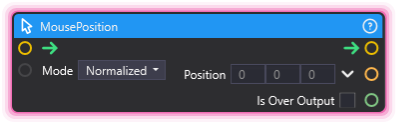
Mode(Dropdown) - Coordinate space (Normalized or Pixel)
👈 Outputs:
Position(Vector3) - Cursor coordinates in the chosen mode (Z is always 0)Is Over Output(Boolean) - True while the cursor is inside the Output rect
🎬 Streaming Example: “Spawn a sparkle at the cursor position whenever a viewer clicks during a giveaway segment - normalized mode keeps it aligned regardless of preview resolution.”
🎯 Tips: Pair with InputListener to react to clicks at the cursor location. Use Pixel mode when sampling a texture; use Normalized mode for resolution-independent placement.