Component Nodes
These 7 nodes manage components on scene objects at runtime. Reach for them to add or remove components, enable or disable them, read and write their properties, or find every object carrying a given component.
ComponentAdd
Section titled “ComponentAdd”💡 Simple Explanation: Adds a component to an object at runtime. Dynamically extends object capabilities.
⚙️ Technical Description: Synchronous node that dynamically adds a component to a Scene Object at runtime by locating the component type by name.
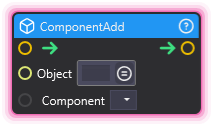
🔍 Full Details & Examples
🔧 How It Works: Finds component type by name and attaches it to the Scene Object.
✨ Perfect For:
- Runtime composition
- Dynamic behavior addition
- Adding temporary effects
👉 Inputs:
Object(SceneObject) - Target objectComponent(Dropdown) - Component type to add
🎬 Streaming Example: “Add Rigidbody to object when donation triggers physics mode.”
🎯 Tips: Select the component type from the Component dropdown - it lists all supported components. See Components for the full catalog organized by category.
ComponentGetProperty
Section titled “ComponentGetProperty”💡 Simple Explanation: Reads a component’s property value each time it runs, with change detection.
⚙️ Technical Description: Synchronous node that reads a component property each time it runs, then fires its output; On Change fires first when the value read differs from the last value read.
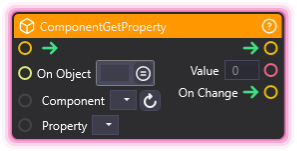
🔍 Full Details & Examples
🔧 How It Works: Retrieves property value from named component. on_change output fires when the value read differs from the last value read.
✨ Perfect For:
- Monitoring component states
- Reactive systems
- Triggering logic on changes
👉 Inputs:
On Object(SceneObject) - Target objectComponent(Dropdown) - Component class nameProperty(Dropdown) - Property to read
👈 Outputs:
Value(Object) - Last value read from the propertyOn Change(Trigger) - Fires when the value read differs from the last value read
🎬 Streaming Example: “Monitor object position and trigger effect when it crosses threshold.”
🎯 Tips: On Change fires only on a run whose value read differs from the last value read, so trigger the node repeatedly (from OnNewFrame or a Timer, for example) to watch a property; the first read after the graph starts only sets Value. An empty value (a reference property with nothing assigned) is read like any other: Value is emptied, and a change to or from it fires On Change. A list is compared by the items it holds. A run that reads nothing (the object, component or property cannot be found, or the property cannot be read) logs a warning, leaves Value and the comparison as they were, and the flow continues. Very powerful for reactive systems.
ComponentRemove
Section titled “ComponentRemove”💡 Simple Explanation: Removes a component from an object. Cleanup and dynamic behavior changes.
⚙️ Technical Description: Synchronous node that removes a specified component from a Scene Object using proper cleanup.
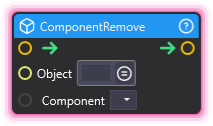
🔍 Full Details & Examples
🔧 How It Works: Finds and destroys specified component from the Scene Object.
✨ Perfect For:
- Cleanup
- Removing temporary behaviors
- Disabling effects permanently
👉 Inputs:
scene_object(SceneObject) - Target objectcomponent_name(String) - Component class name
🎬 Streaming Example: “Remove physics after destruction animation completes.”
🎯 Tips: Component is permanently removed. Can’t be undone without re-adding.
ComponentReset
Section titled “ComponentReset”💡 Simple Explanation: Resets component to default values. Restores original state.
⚙️ Technical Description: Synchronous node that resets a component to default values by creating a temporary object with defaults and copying the values.
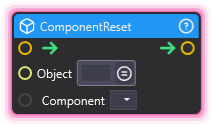
🔍 Full Details & Examples
🔧 How It Works: Creates temp object with default values and applies them to component.
✨ Perfect For:
- Resetting state
- Restoring defaults
- Cleaning up modified objects
👉 Inputs:
scene_object(SceneObject) - Target objectcomponent_name(String) - Component class name
🎬 Streaming Example: “Reset animation controller to idle state.”
🎯 Tips: Useful for cleaning up modified components between uses.
ComponentSetEnable
Section titled “ComponentSetEnable”💡 Simple Explanation: Enables or disables a component. Toggles component functionality.
⚙️ Technical Description: Synchronous node that sets the enabled property on a component to toggle its active state.
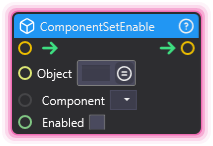
🔍 Full Details & Examples
🔧 How It Works: Sets component’s enabled property to true/false.
✨ Perfect For:
- Toggling behaviors
- Conditional functionality
- Optimizing performance
👉 Inputs:
- (SceneObject) - Target object
Component(Dropdown) - Component class nameEnabled(Boolean) - New state
🎬 Streaming Example: “Disable particle system between effects.”
🎯 Tips: Not all components support enabled/disabled. Most Behaviours do.
ComponentSetProperty
Section titled “ComponentSetProperty”💡 Simple Explanation: Changes a component’s property value. Configures components dynamically.
⚙️ Technical Description: Synchronous node that sets a property value on a component and saves the ProjectItem to persist changes.
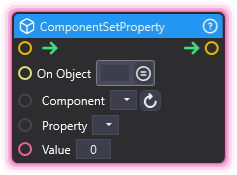
🔍 Full Details & Examples
🔧 How It Works: Sets named property on component. Saves to project, may trigger reload.
✨ Perfect For:
- Dynamic configuration
- Runtime adjustments
- Customizing effects
👉 Inputs:
On Object(SceneObject) - Target objectComponent(Dropdown) - Component class nameProperty(Dropdown) - Property to setValue(Object) - New value
🎬 Streaming Example: “Set particle emission rate based on donation amount.”
🎯 Tips: If the component you would like to edit is on an object that does not exist at setup time (e.g., an object coming from a Spawner node), set up a dummy object in the scene with the component, configure this node, then remove the dummy object.
GetSceneObjectsWithComponent
Section titled “GetSceneObjectsWithComponent”💡 Simple Explanation: Finds all objects that have a specific component type. Search for objects by what they can do.
⚙️ Technical Description: Retrieves all scene objects that have a specific component type attached, returning them as an array.
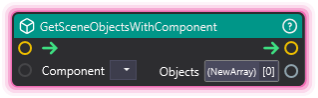
🔍 Full Details & Examples
🔧 How It Works: Select a component type from the dropdown and the node outputs an array of all scene objects in the scene that have that component attached.
✨ Perfect For:
- Finding all objects with physics components (Rigidbody)
- Locating all animated objects (Animator)
- Collecting all objects with audio sources
- Performing batch operations on objects sharing a component type
👉 Inputs:
Component(Dropdown) - Component type to search for
👈 Outputs:
Objects(Array) - Array of scene object identifiers
🎬 Streaming Example: “Find all Rigidbody objects and apply an explosion force when a big donation comes in.”
🎯 Tips: Use the refresh button to update the component list when the scene changes. The output array can be used with ForEachArrayItem to process each object.