Asset
These 9 nodes work with assets from your node graphs. Reach for them when you need to read or change an asset’s properties, create or delete assets, swap material shaders, or react when an asset is re-imported.
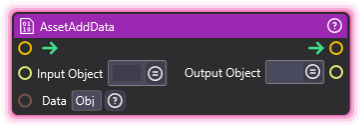
AssetAddData
Section titled “AssetAddData”💡 Simple Explanation: Adds data/metadata to assets. Extends asset capabilities.
⚙️ Technical Description: Synchronous node that attaches generic data to RuntimeAsset objects using the AddDataToAsset() method and outputs the modified asset.
🔍 Full Details & Examples
🔧 How It Works: Attaches generic data to supported asset types.
✨ Perfect For:
- Adding metadata
- Extending asset functionality
- Tagging assets with extra info
👉 Inputs:
- (RuntimeAsset) - Target asset to modify
Data(Object) - Data to attach
👈 Outputs:
- (RuntimeAsset) - Modified asset
🎬 Streaming Example: “Add custom metadata to video assets for categorization.”
🎯 Tips: Not all asset types support this. Check asset type compatibility.
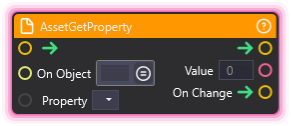
AssetGetProperty
Section titled “AssetGetProperty”💡 Simple Explanation: Reads an asset property value each time it runs, with change detection.
⚙️ Technical Description: Synchronous node that reads an asset property each time it runs, then fires its output; On Change fires first when the value read differs from the last value read.
🔍 Full Details & Examples
🔧 How It Works: Retrieves property value from asset, with on_change trigger.
✨ Perfect For:
- Monitoring asset properties
- Reactive systems
- Triggering logic on changes
👉 Inputs:
On Object(RuntimeAsset) - Target assetProperty(Dropdown) - Name of property to read
👈 Outputs:
Value(Object) - Last value read from the propertyOn Change(Trigger) - Fires when the value read differs from the last value read
🎬 Streaming Example: “Watch your background video’s Volume and flash a volume badge whenever a chat command changes it.”
🎯 Tips: On Change fires only on a run whose value read differs from the last value read, so trigger the node repeatedly (from OnNewFrame or a Timer, for example) to watch a property; the first read after the graph starts only sets Value. An empty value (a reference property with nothing assigned, such as an empty texture slot) is read like any other: Value is emptied, and a change to or from it fires On Change. A list is compared by the items it holds. A run that reads nothing (the asset or property cannot be found, or the property cannot be read) logs a warning, leaves Value and the comparison as they were, and the flow continues. Similar to ComponentGetProperty.
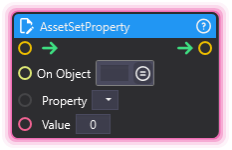
AssetSetProperty
Section titled “AssetSetProperty”💡 Simple Explanation: Modifies asset properties. Configure assets dynamically.
⚙️ Technical Description: Async node that sets a property value on a RuntimeAsset and calls asset.Save() to persist the changes.
🔍 Full Details & Examples
🔧 How It Works: Sets property value and saves asset.
✨ Perfect For:
- Dynamic asset configuration
- Runtime adjustments
- Persisting changes
👉 Inputs:
On Object(RuntimeAsset) - Target assetProperty(Dropdown) - Name of property to setValue(Object) - New value to apply
🎬 Streaming Example: “Change video playback speed based on donation amount.”
🎯 Tips: Saves asset after modification. Changes persist.
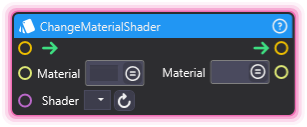
ChangeMaterialShader
Section titled “ChangeMaterialShader”💡 Simple Explanation: Switches the shader on a Material asset (or any asset that owns an embedded Material like Capture or Stream). Pick a shader from the dropdown or feed in a String for dynamic selection.
⚙️ Technical Description: Synchronous node that resolves a Material from the supplied asset tag, then applies the named shader through ShaderOperations.ChangeShader. Logs a warning and skips the assignment when the asset has no resolvable Material or the shader name is unknown.
🔍 Full Details & Examples
🔧 How It Works: Reads the Material tag and the chosen shader name, resolves the Material from the asset (handling assets with embedded Materials like Capture, Stream, or SceneCameraMaterial), then applies the new shader and outputs the same Material tag for downstream chaining.
✨ Perfect For:
- Switching visual styles on the fly
- Swapping shaders during scene transitions
- Driving look changes from viewer events
- Theming overlays without duplicating Materials
👉 Inputs:
Material(ObjectSelector) - Material asset (or asset with an embedded Material) to modifyShader(Dropdown) - Shader display name to apply (refresh to repopulate)
👈 Outputs:
Material(ObjectSelector) - Same Material asset, now using the selected shader
🎬 Streaming Example: “When a chat command lands, swap the overlay’s Material from the default lit shader to a glowing emissive shader for a few seconds before swapping back.”
🎯 Tips: Use ListShaders to discover available names at runtime. Pair with GetMaterialShader to read the current shader before swapping so you can restore it later.
CreateAsset
Section titled “CreateAsset”💡 Simple Explanation: Creates new runtime assets. Dynamic asset generation.
⚙️ Technical Description: Synchronous node that creates a new RuntimeAsset of a specified type with configurable name and folder location.
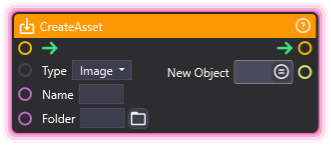
🔍 Full Details & Examples
🔧 How It Works: Creates new asset of specified type at runtime.
✨ Perfect For:
- Dynamic content creation
- Generating materials/textures
- Runtime resource management
👉 Inputs:
type(Enum) - Asset type (Material, Video, Image, etc.)name(String) - Name for new assetfolder(String) - Target folder path (optional)
👈 Outputs:
asset_tag(String) - Tag of the created asset
🎬 Streaming Example: “Create new material asset for each donation tier.”
🎯 Tips: Folder must be child of root asset folder. Returns tag for reference.
DeleteAsset
Section titled “DeleteAsset”💡 Simple Explanation: Deletes runtime assets. Cleanup and management.
⚙️ Technical Description: Synchronous node that permanently removes a RuntimeAsset from the project by calling asset.DeleteAsset().
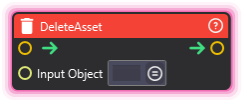
🔍 Full Details & Examples
🔧 How It Works: Removes asset from project.
✨ Perfect For:
- Cleanup
- Dynamic asset management
- Removing temporary resources
👉 Inputs:
asset_tag(String) - Tag of asset to delete
🎬 Streaming Example: “Delete temporary assets after stream ends.”
🎯 Tips: Permanent deletion. Use carefully.
GetMaterialShader
Section titled “GetMaterialShader”💡 Simple Explanation: Reads the current shader name from a Material asset. Use it to find out what shader is active before swapping or to branch logic on the look.
⚙️ Technical Description: Synchronous node that resolves a Material from the supplied asset tag, queries the active shader through ShaderOperations.GetShader, and outputs the display name.
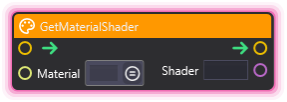
🔍 Full Details & Examples
🔧 How It Works: Resolves the Material from the asset tag (including assets with embedded Materials like Capture or Stream), looks up the currently bound shader, and outputs its display name as a String. Returns empty when the asset has no resolvable Material.
✨ Perfect For:
- Inspecting current visual state
- Branching logic based on the active shader
- Round-tripping shader settings before and after a swap
- Debugging unexpected look changes
👉 Inputs:
Material(ObjectSelector) - Material asset (or asset with an embedded Material) to inspect
👈 Outputs:
Shader(String) - Display name of the active shader, or empty if unresolvable
🎬 Streaming Example: “Before a chat command swaps the overlay shader, store the old name with this node so you can restore it when the moment ends.”
🎯 Tips: Pair with ChangeMaterialShader to swap, or with ListShaders to compare against the full available set.
OnAssetReImported
Section titled “OnAssetReImported”💡 Simple Explanation: Triggers when asset is re-imported. React to external changes.
⚙️ Technical Description: UpdaterNode that subscribes to the AssetRefreshed event and triggers output when the specified asset is re-imported from disk.
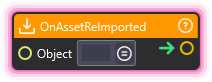
🔍 Full Details & Examples
🔧 How It Works: Monitors asset and fires when it’s re-imported from disk.
✨ Perfect For:
- Reacting to external file changes
- Updating dependencies
- Hot-reloading workflows
👉 Inputs:
asset_tag(String) - Tag of asset to monitor
🎬 Streaming Example: “Reload scene when overlay asset is updated externally.”
🎯 Tips: Useful for hot-reloading workflows. Detects external file changes.
ListShaders
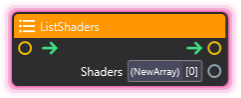
Section titled “ListShaders”💡 Simple Explanation: Returns the full list of shader names you can use with ChangeMaterialShader. Drive dropdowns, validation, or random shader picks from real runtime data.
⚙️ Technical Description: Synchronous node that calls ShaderOperations.ListShaders and writes the resulting display-name array into a String Array port. Logs a warning and outputs an empty array on failure.
🔍 Full Details & Examples
🔧 How It Works: Asks the renderer for every shader name available in the project, packages each name as a String entry, and outputs the full list as an Array.
✨ Perfect For:
- Discovering available shaders at runtime
- Building dropdown menus from live data
- Validating shader names before assignment
- Randomizing the look across viewer events
👈 Outputs:
Shaders(Array) - String Array of available shader display names
🎬 Streaming Example: “Pull the shader list at scene start, then let chat votes pick which one to apply to the camera Material for the next segment.”
🎯 Tips: Names returned here match the dropdown options on ChangeMaterialShader. Iterate the array with ForLoop to inspect each entry.