Animations
These 19 animation nodes move and animate objects in your OverMox scene. Use them to play, pause, resume, and stop animations, blend and scrub clips, read live playback state, react to playback events and marker crossings, tween position, rotation, or scale, send objects along curved paths, and add motion like jiggle effects to alerts and overlays.
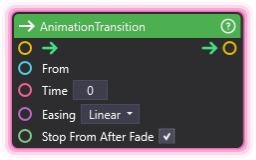
AnimationTransition
Section titled “AnimationTransition”💡 Simple Explanation: Smoothly fades a new animation in while fading the previous ones out.
⚙️ Technical Description: Synchronous node that fades a new clip in while fading outgoing playbacks out through the Animator component; wire a PlayAnimation node’s Playback handle into From to fade only that playback, or leave From unwired to fade out all active playbacks.
🔍 Full Details & Examples
🔧 How It Works: When executed, it fades the incoming clip in while the outgoing playbacks fade out, shaping the crossfade with the chosen Easing curve. Wire a PlayAnimation node’s Playback handle into From to fade out just that playback; leave From unwired to fade out all active playbacks.
⚠️ The crossfade runs in the PlayAnimation on the output: This node’s output trigger must feed a PlayAnimation node directly. That PlayAnimation performs the fade and reads Time, Easing, and Stop From After Fade from the transition that triggered it, so those three inputs take effect only on a direct connection; routed through any other node they do nothing. With From unwired, this node also stops the PlayAnimation feeding its input trigger and hands the fade-out of the remaining playbacks to the PlayAnimation on the output; with nothing on the output, that upstream play simply stops and nothing fades.
✨ Perfect For:
- Smooth animation sequencing
- Preventing overlapping animations
- Clean state changes
👉 Inputs:
From(Handle) - Optional outgoing playback handle that scopes which playback the transition fades fromTime(Float) - Transition duration in secondsEasing(Dropdown) - Fade easing curve for the transition ramp (Linear, EaseIn, EaseOut, EaseInOut); accepts a wired String overrideStop From After Fade(Boolean) - Stop the outgoing playback when the fade completes; enabled by default
🎬 Streaming Example: “Transition from idle to celebration animation cleanly.”
🎯 Tips: Wire a PlayAnimation node’s Playback handle into From to fade out exactly that playback; leave From unwired to fade out all active playbacks. Pick an Easing curve to shape how the fade ramps.
Jiggle
Section titled “Jiggle”💡 Simple Explanation: Adds shake/wobble effect to objects. Great for impact or attention-grabbing.
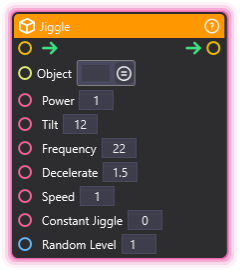
⚙️ Technical Description: Synchronous node that attaches a fresh jiggling component to a Scene Object on every run, replacing any jiggle already on it, with customizable power, frequency, tilt, and deceleration parameters.
🔍 Full Details & Examples
🔧 How It Works: Adds a jiggling component with configurable power, frequency, and dampening. Running the node again while the object still wobbles puts the object back in the pose its jiggle started from before the fresh jiggle starts, so repeated runs never shift the object.
✨ Perfect For:
- Impact effects
- Screen shake
- Attention-grabbing UI
- Reacting to loud sounds
👉 Inputs:
- (SceneObject) - Object to jiggle
Power(Float) - Strength of the shakeTilt(Float) - Tilt intensityFrequency(Float) - Speed of the shakeDecelerate(Float) - How quickly it stopsSpeed(Float) - Settle speed: higher values die out faster with a smaller swing. Must be greater than 0Constant Jiggle(Float) - Continuous jiggle amountRandom Level(Integer) - Random variation level. Must be 1 or more
🎬 Streaming Example: “Shake screen when big donation comes in.”
🎯 Tips: Works on UI and 3D objects. Higher power = stronger shake. Deceleration controls how fast it stops. A Random Level below 1 or a Speed of 0 or less logs a warning and skips the jiggle, and the flow continues.
PlayAnimation
Section titled “PlayAnimation”💡 Simple Explanation: Plays animation clips on objects. Supports crossfade transitions.
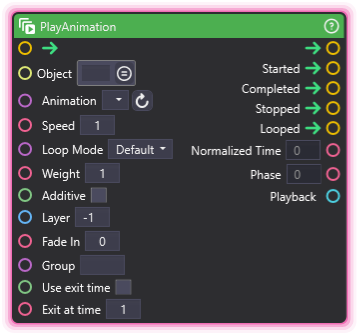
⚙️ Technical Description: Synchronous node that plays animation clips on Animator components with ports for object, animation name, speed, loop mode, weight, additive layering, blend layer, and fade-in, firing Started, Completed, Stopped, and Looped triggers alongside Normalized Time and Phase outputs, and supporting crossfade with AnimationTransition.
🔍 Full Details & Examples
🔧 How It Works: When triggered, it plays the named clip on the Animator component using the selected Loop Mode. Clips play concurrently, so a face and a body loop can coexist, and Fade In ramps this clip up while other active clips ramp out and stop. The Started trigger fires on launch, Looped fires once per completed loop, and Completed fires when the clip reaches its natural end.
Every playback also holds a blend layer, and the layer numbers set the order the playbacks are evaluated in. Layer defaults to -1, which means OverMox picks the lowest free layer for you. Set Layer to 0 or above to claim that exact layer instead, and the playback keeps it until the clip stops.
⚠️ A requested Layer is only handed over inside the same Group: If the layer you ask for is already held by a live playback, the request is refused outright. Nothing is evicted, nothing silently falls back to a different layer, and the clip does not start. The one exception is Replace Group: turn it on and give this play the same Group name as the playback holding the layer, and that playback is retired in the same frame so this clip takes the layer over. A holder in a different group, or in no group at all, is refused either way. The optional layer argument on the play and playSet actions is refused the same way, carries the same replaceGroup opt-in (there it has no -1 shorthand: leave the argument out for the automatic pick, since a negative value is rejected as invalid input), and playSet is all-or-nothing: one colliding entry, whether it clashes with a live playback or with another entry in the same set, refuses the whole set before any clip starts. Both actions report the layer each playback ended up on in their response, whether you asked for that layer or OverMox picked it.
✨ Perfect For:
- Character animations
- Animated effects
- Object movement sequences
👉 Inputs:
- (SceneObject) - Object with Animator
Animation(Dropdown) - Animation clip to play; accepts a wired String clip-name overrideSpeed(Float) - Playback speed (1 = normal, -1 = reverse)Loop Mode(Dropdown) - Default (the clip’s own wrap mode), Once, Loop, PingPong, or ClampForever; accepts a wired String overrideWeight(Float) - Blend strength from 0 to 1 for layering with other clipsAdditive(Boolean) - When enabled, layers this clip on top of others instead of replacing themLayer(Integer) - Blend layer to claim; -1 (the default) lets OverMox pick the lowest free layer, 0 or above requests that exact layer and the play is refused if it is already taken, unless Replace Group licenses the handoffFade In(Float) - Seconds to ramp this clip in while other active clips ramp out and stop; 0 plays immediatelyGroup(String) - Optional group name recorded on this playback so group-scoped controls can address itUse exit time(Boolean) - When enabled, the node exits at the specified normalized timeExit at time(Float) - Exit at the specified normalized timeReplace Group(Boolean) - Lets this play take an explicit Layer already held by a live playback in the same named Group, retiring that playback in the same frame instead of refusing the request
👈 Outputs:
Started(Trigger) - Fires when playback startsCompleted(Trigger) - Fires once at the clip’s natural end, no exit-time gate neededStopped(Trigger) - Fires when playback is stopped earlyLooped(Trigger) - Fires per completed loop (a full round trip under PingPong)Normalized Time(Float) - Raw playback progress (negative under a reverse loop, unbounded under PingPong)Phase(Float) - Reflected clip-local position, always 0-1Playback(Handle) - Live handle for this play; wire it into control or transition nodes to target exactly this playback
🎬 Streaming Example: “Play victory dance animation when donation goal reached.”
🎯 Tips: Requires an Animator component. Clips play concurrently - different-region clips like a face and a body loop coexist happily, while two clips driving the SAME bones override each other unless you enable Additive. Use AnimationTransition for a clean crossfade, SetAnimationWeight to blend layered clips live, and a negative Speed to play in reverse. Loop Mode’s PingPong gives a back-and-forth bounce, and the Phase output stays a clean 0-1 even when Normalized Time runs negative or past 1 under looping. Leave Layer at -1 unless stacking order matters to you; it pays off with Additive blending in a long-running session, where the layer order decides the final pose and an auto-picked layer shifts as clips come and go, so pinning each clip to a known layer keeps the stack the same every time. The getPlaybacks action lists the layer every live playback holds, so you can check what is occupied before asking for one.
ResetAnimation
Section titled “ResetAnimation”💡 Simple Explanation: Returns an animation to its starting frame.
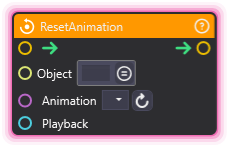
⚙️ Technical Description: Synchronous node that resets a specified animation clip to frame 0 by calling ResetAnimation() on the Animator component.
🔍 Full Details & Examples
🔧 How It Works: Resets specified animation clip to frame 0.
✨ Perfect For:
- Loop preparation
- State resets
- Animation cleanup
👉 Inputs:
- (SceneObject) - Object with Animator
Animation(Dropdown) - Animation clip to reset; accepts a wired String clip-name overridePlayback(Handle) - Optional playback handle that takes precedence over Object + Animation; a live handle targets exactly that playback, a finished or unknown handle warns and does nothing, and leaving it unwired uses Object + Animation
🎬 Streaming Example: “Reset celebration animation before replaying for next donation.”
🎯 Tips: Useful before looping or re-triggering animations.
StopAnimation
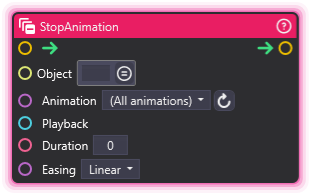
Section titled “StopAnimation”💡 Simple Explanation: Stops one animation clip, or all of them when the Animation dropdown is set to (All animations).
⚙️ Technical Description: Synchronous node that stops a named clip on the Animator component, or every active clip on the Scene Object when the Animation dropdown is set to (All animations). A positive Duration ramps each resolved clip’s weight to zero along the chosen Easing curve before retiring it and freeing its layer; a Duration of zero stops immediately.
🔍 Full Details & Examples
🔧 How It Works: Stops the named clip, or every clip playing on the Object when Animation is set to (All animations). With Duration at zero the stop is instant; with a positive Duration each targeted clip fades its weight to zero over that many seconds along the Easing curve, then releases its layer.
✨ Perfect For:
- Emergency animation stops
- State resets
- Scene cleanup
👉 Inputs:
- (SceneObject) - Object to stop animations on
Animation(Dropdown) - Defaults to (All animations); pick a clip to stop just one; accepts a wired String clip-name overridePlayback(Handle) - Optional playback handle that takes precedence over Object + Animation; a live handle targets exactly that playback, a finished or unknown handle warns and does nothing, and leaving it unwired uses Object + AnimationDuration(Float) - Seconds to fade each resolved playback’s weight to zero before retiring it; 0 (the default) stops immediatelyEasing(Dropdown) - Fade easing curve for a timed stop (Linear, EaseIn, EaseOut, EaseInOut); applies only when Duration is above zero; accepts a wired String override
🎬 Streaming Example: “Stop all animations when switching scenes.”
🎯 Tips: Defaults to (All animations); pick a specific clip to stop just that one. Set Duration above zero for a smooth fade-out and shape its ramp with the Easing curve; leave Duration at zero for an instant stop. Pair with PauseAnimation if you want to freeze a clip in place instead of ending it.
Interpolate
Section titled “Interpolate”💡 Simple Explanation: Blends between two values based on a percentage. Great for smooth transitions and calculations.
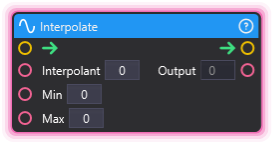
⚙️ Technical Description: Performs linear interpolation (lerp) between min and max values based on an interpolation parameter t (0-1).
🔍 Full Details & Examples
🔧 How It Works: Returns a value between min and max based on t. When t=0, returns min. When t=1, returns max. When t=0.5, returns the midpoint.
✨ Perfect For:
- Smooth value transitions
- Progress calculations
- Blending between states
- Percentage-based calculations
👉 Inputs:
Interpolant(Float) - The t value (0 to 1)Min(Float) - Starting value (returned when t=0)Max(Float) - Ending value (returned when t=1)
👈 Outputs:
Output(Float) - Interpolated result
🎬 Streaming Example: “Smoothly transition volume from 0 to 100 based on a slider input.”
🎯 Tips: Unlike tween nodes, this calculates instantly without animation. Use for mathematical blending, not motion.
PositionTween
Section titled “PositionTween”💡 Simple Explanation: Smoothly moves an object from its current position to a target position over time.
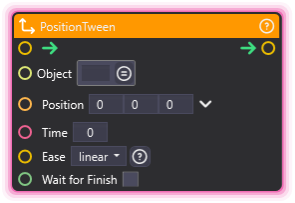
⚙️ Technical Description: Animates a Scene Object’s transform.position to a target Vector3 using LeanTween with configurable easing and duration.
🔍 Full Details & Examples
🔧 How It Works: Uses LeanTween to smoothly animate position over time with easing curves for natural-looking motion.
✨ Perfect For:
- Moving objects on screen
- UI animations
- Object entrance/exit effects
- Camera movements
👉 Inputs:
- (SceneObject) - Object to move
Position(Vector3) - Target position (X, Y, Z)Time(Float) - Duration in secondsEase(Dropdown) - Easing curve typeWait for Finish(Boolean) - Block execution until completeReplace Existing(Boolean) - Stops this object’s live position tween before starting, so the new tween takes the value over instead of fighting the old one
👈 Outputs:
- Trigger fires when tween completes
🎬 Streaming Example: “Slide a reward panel in from off-screen when a subscriber joins.”
🎯 Tips: Set Time to 0 for instant position change. Use easing like easeOutBounce for playful effects. Enable Wait for Finish to chain animations. Turn on Replace Existing when the node can re-trigger before the previous tween lands, otherwise the two tweens stack and fight over the same position.
RotationTween
Section titled “RotationTween”💡 Simple Explanation: Smoothly rotates an object from its current rotation to a target rotation over time.
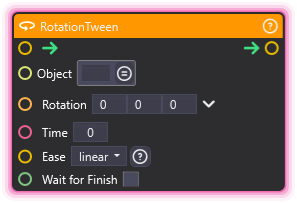
⚙️ Technical Description: Animates a Scene Object’s transform.eulerAngles to a target rotation using LeanTween with configurable easing and duration.
🔍 Full Details & Examples
🔧 How It Works: Uses LeanTween to smoothly animate rotation over time with easing curves for natural-looking motion.
✨ Perfect For:
- Spinning objects
- Turning characters
- UI element rotations
- Visual attention effects
👉 Inputs:
- (SceneObject) - Object to rotate
Rotation(Vector3) - Target rotation in degrees (X, Y, Z)Time(Float) - Duration in secondsEase(Dropdown) - Easing curve typeWait for Finish(Boolean) - Block execution until completeReplace Existing(Boolean) - Stops this object’s live rotation tween before starting, so the new tween takes the value over instead of fighting the old one
👈 Outputs:
- Trigger fires when tween completes
🎬 Streaming Example: “Spin a wheel 360 degrees when someone redeems channel points.”
🎯 Tips: Rotation values are in degrees. Use 360 for full rotations. Easing affects speed curve throughout the rotation. Turn on Replace Existing when the node can re-trigger before the previous tween lands, otherwise the two tweens stack and fight over the same rotation.
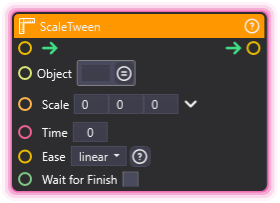
ScaleTween
Section titled “ScaleTween”💡 Simple Explanation: Smoothly scales an object from its current size to a target size over time.
⚙️ Technical Description: Animates a Scene Object’s transform.localScale to a target Vector3 using LeanTween with configurable easing and duration.
🔍 Full Details & Examples
🔧 How It Works: Uses LeanTween to smoothly animate scale over time with easing curves for natural-looking size changes.
✨ Perfect For:
- Pop-in effects
- Growing/shrinking objects
- UI emphasis animations
- Impact effects
👉 Inputs:
- (SceneObject) - Object to scale
Scale(Vector3) - Target scale (X, Y, Z)Time(Float) - Duration in secondsEase(Dropdown) - Easing curve typeWait for Finish(Boolean) - Block execution until completeReplace Existing(Boolean) - Stops this object’s live scale tween before starting, so the new tween takes the value over instead of fighting the old one
👈 Outputs:
- Trigger fires when tween completes
🎬 Streaming Example: “Make a notification pop up by scaling from 0 to 1 with easeOutBack for a bouncy entrance.”
🎯 Tips: Scale of (1,1,1) is normal size. Use (0,0,0) to shrink away. easeOutBack creates an overshoot bounce effect. Turn on Replace Existing when the node can re-trigger before the previous tween lands, otherwise the two tweens stack and fight over the same scale.
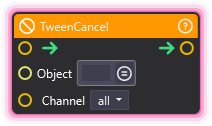
TweenCancel
Section titled “TweenCancel”💡 Simple Explanation: Stops the tweens already running on an object, freezing each one exactly where it is.
⚙️ Technical Description: Synchronous node that cancels the live tweens registered for a Scene Object, scoped to one transform channel or to all of them; each cancelled tween holds the value it had reached instead of snapping to its target.
🔍 Full Details & Examples
🔧 How It Works: When triggered, it looks up every live tween registered against the chosen Scene Object and stops the ones matching the Channel you picked. All stops every tween on the object, while Position, Rotation and Scale each stop only the tweens writing that part of the transform. Cancelling freezes the transform at its current value, so nothing jumps. A tween that has already finished is simply not there to stop, and the node continues downstream either way.
✨ Perfect For:
- Interrupting a slide when an event takes over
- Freezing a prop mid-move
- Clearing one channel while the others keep running
- Cutting motion short without waiting for the tween to finish
👉 Inputs:
- (SceneObject) - Object whose tweens are stopped
Channel(Dropdown) - Which tweens to stop:all,position,rotationorscale; accepts a wired String override
👈 Outputs:
- Trigger fires once the matching tweens have been stopped
🎬 Streaming Example: “A viewer redeem interrupts a slow banner slide, so cancel the tween and let the overlay hold where it stopped.”
🎯 Tips: Cancelling freezes the object where it stands rather than snapping it to the tween end value, so pair it with a PositionTween from the frozen value when you want a controlled recovery. Tweens started outside the graph on the same object and channel are in scope too. If you only ever want the newest move to win, Replace Existing on the tween node itself is simpler than a separate cancel.
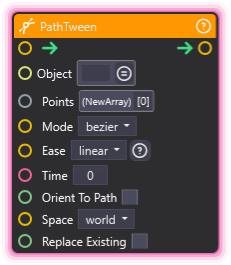
PathTween
Section titled “PathTween”💡 Simple Explanation: Sends an object along a route you lay out as a list of points, curving smoothly through them instead of stopping at each one.
⚙️ Technical Description: Synchronous node that moves a Scene Object along a curved path built from an Array of Vector3 waypoints, with a shaping mode, an easing curve across the whole move, and optional orientation to the direction of travel.
🔍 Full Details & Examples
🔧 How It Works: Wire an Array of Vector3 values into Points, in the order the object should visit them, and the node works out the curve that runs through them. Mode picks how the route is shaped between the points: bezier fits a smooth curve through them, spline runs a spline through them, and both visit every point you supply. Time is the span of the whole move rather than one leg, and Ease shapes the pacing across the entire route. Space reads the points as world coordinates or as coordinates relative to the object’s parent. The move drives absolute positions, so the object jumps to the first point when it begins; pass its current position as the first point when you want the motion to be continuous. The node registers on the position channel, so TweenCancel and Replace Existing on a PositionTween both reach it, and the output trigger fires as soon as the move starts rather than when it lands.
✨ Perfect For:
- Flying a camera rig along a scripted route in one continuous move
- Sweeping an overlay prop in an arc across the frame instead of a straight line
- Walking an object through a repeatable pattern without chaining a tween per leg
- Orbit passes and fly-throughs that a straight slide between two positions cannot describe
👉 Inputs:
- (SceneObject) - Object to move along the path
Points(Array) - Array of Vector3 waypoints the object visits, in order; at least two are neededMode(Dropdown) - How the route is shaped between the points:bezierorspline; accepts a wired String overrideEase(Dropdown) - Easing curve applied across the whole route rather than per leg; accepts a wired String overrideTime(Float) - Duration in seconds for the whole moveOrient To Path(Boolean) - Turns the object to face the direction it is travellingSpace(Dropdown) - Whether the points are read asworldcoordinates or aslocalcoordinates relative to the object’s parent; accepts a wired String overrideReplace Existing(Boolean) - Stops this object’s live position tween before starting, so the new move takes the position over instead of fighting the old one
👈 Outputs:
- Trigger fires once the move has started
🎬 Streaming Example: “Fly the camera in a curve around the stage on a raid alert instead of sliding it straight across.”
🎯 Tips: Read the object’s current position and pass it as the first point when the motion needs to be continuous, otherwise the object snaps to the start of the route. Two points describe a straight line, so add a middle point wherever the route should bow. Turn on Orient To Path for anything that should look like it is following the route rather than sliding sideways along it. The output trigger fires when the move starts rather than when it lands, so put anything that must happen afterwards behind a Delay set to the same Time.
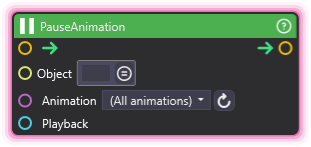
PauseAnimation
Section titled “PauseAnimation”💡 Simple Explanation: Freezes a playing clip right where it is. Like hitting pause on a video, the pose holds until you resume it.
⚙️ Technical Description: Synchronous node that pauses one playing clip on the Animator component, or every playing clip on the Object when the Animation dropdown is set to (All animations).
🔍 Full Details & Examples
🔧 How It Works: Pauses the named clip in place, holding its current frame. Set Animation to (All animations) to pause every clip playing on the Object at once. Resume later with ResumeAnimation.
✨ Perfect For:
- Freezing a character mid-pose
- Holding a reaction on a big moment
- Pausing overlays while you read chat
- Timing a clip to a countdown
👉 Inputs:
- (SceneObject) - Object with Animator
Animation(Dropdown) - Defaults to (All animations); pick a clip to pause just one; accepts a wired String clip-name overridePlayback(Handle) - Optional playback handle that takes precedence over Object + Animation; a live handle targets exactly that playback, a finished or unknown handle warns and does nothing, and leaving it unwired uses Object + Animation
🎬 Streaming Example: “Freeze the hype animation mid-swing when a raid hits, then resume once you welcome the raiders.”
🎯 Tips: Pairs with ResumeAnimation to continue from the exact frame. Defaults to (All animations) to pause everything on the Object at once; pick a specific clip to pause just that one.
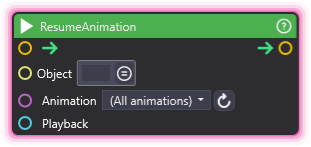
ResumeAnimation
Section titled “ResumeAnimation”💡 Simple Explanation: Restarts a paused clip from the exact frame it froze on. Like pressing play again after a pause.
⚙️ Technical Description: Synchronous node that resumes one paused clip on the Animator component, or every paused clip on the Object when the Animation dropdown is set to (All animations).
🔍 Full Details & Examples
🔧 How It Works: Continues the named clip from the frame PauseAnimation stopped it on, at its original speed. Set Animation to (All animations) to resume every paused clip on the Object.
✨ Perfect For:
- Continuing a held pose
- Resuming overlays after a break
- Restarting motion on a cue
- Un-freezing a reaction
👉 Inputs:
- (SceneObject) - Object with Animator
Animation(Dropdown) - Defaults to (All animations); pick a clip to resume just one; accepts a wired String clip-name overridePlayback(Handle) - Optional playback handle that takes precedence over Object + Animation; a live handle targets exactly that playback, a finished or unknown handle warns and does nothing, and leaving it unwired uses Object + Animation
🎬 Streaming Example: “Resume the idle loop when you come back from a ‘be right back’ screen.”
🎯 Tips: Pairs with PauseAnimation. A clip has to be paused first, so resuming a clip that never paused does nothing.
SetAnimationWeight
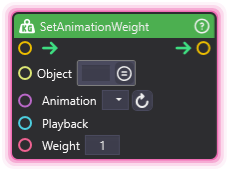
Section titled “SetAnimationWeight”💡 Simple Explanation: Sets how strongly a clip shows when it is layered with others. Weight 1 is full strength, 0 hides it.
⚙️ Technical Description: Synchronous node that sets the blend weight (0 to 1) of a clip on the Animator component, controlling how much it contributes when several clips play at once.
🔍 Full Details & Examples
🔧 How It Works: Applies a blend weight from 0 to 1 to the named clip live. At 1 the clip plays at full strength, at 0.5 it mixes half with other clips on the same bones, and at 0 it stops contributing. Change it while a clip plays for smooth layering. Leave the Animation dropdown empty (no clip chosen) to apply the weight to every active playback on the object at once, the same as the API’s setWeight with no animation; choose or wire a clip to weight just that one. SetAnimationSpeed differs here - it always targets a single clip.
✨ Perfect For:
- Blending a face expression over a body loop
- Fading a clip in or out by strength
- Layering reaction animations
- Mixing two poses live
👉 Inputs:
- (SceneObject) - Object with Animator
Animation(Dropdown) - Clip to weight; accepts a wired String clip-name overridePlayback(Handle) - Optional playback handle that takes precedence over Object + Animation; a live handle targets exactly that playback, a finished or unknown handle warns and does nothing, and leaving it unwired uses Object + AnimationWeight(Float) - Blend strength from 0 to 1
🎬 Streaming Example: “Blend a smile over your avatar’s idle by ramping its weight to 1 when chat spams the happy emote.”
🎯 Tips: Feed a changing Float to fade a clip in or out over time. Works with the Weight input on PlayAnimation, which sets a clip’s starting weight when it begins.
SetAnimationSpeed
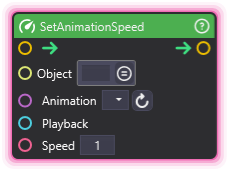
Section titled “SetAnimationSpeed”💡 Simple Explanation: Changes how fast a clip plays while it is running. Negative speed plays it backwards, 0 freezes it in place.
⚙️ Technical Description: Synchronous node that sets the live playback speed of a clip on the Animator component, where 1 is normal, negative values play in reverse, and 0 pauses the clip.
🔍 Full Details & Examples
🔧 How It Works: Applies a new speed multiplier to the named clip while it plays. A value of 1 is normal, 2 is double time, -1 runs it in reverse, and 0 freezes it like a pause. The change takes effect immediately.
✨ Perfect For:
- Slow-motion replays
- Speeding up idle loops on hype
- Reversing an animation mid-play
- Beat-matching motion to music
👉 Inputs:
- (SceneObject) - Object with Animator
Animation(Dropdown) - Clip to adjust; accepts a wired String clip-name overridePlayback(Handle) - Optional playback handle that takes precedence over Object + Animation; a live handle targets exactly that playback, a finished or unknown handle warns and does nothing, and leaving it unwired uses Object + AnimationSpeed(Float) - Playback multiplier (1 = normal, -1 = reverse, 0 = frozen)
🎬 Streaming Example: “Drop an animation to slow motion when a rare drop appears, then snap it back to normal speed.”
🎯 Tips: Use a negative Speed to run a clip backwards without a separate reverse clip. Setting Speed to 0 freezes a clip much like PauseAnimation, but the clip keeps its speed setting instead of a paused state.
SeekAnimation
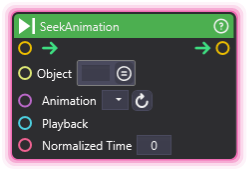
Section titled “SeekAnimation”💡 Simple Explanation: Jumps a clip straight to a point in its timeline, from 0 at the start to 1 at the end. Like scrubbing a video to an exact frame.
⚙️ Technical Description: Synchronous node that sets a clip’s normalized time (0 to 1) on the Animator component, jumping it to that position in the timeline.
🔍 Full Details & Examples
🔧 How It Works: Moves the named clip to a normalized position, where 0 is the first frame, 0.5 is halfway, and 1 is the last frame. A seeked clip that is not playing holds that frozen pose until you PlayAnimation or StopAnimation it.
✨ Perfect For:
- Scrubbing to an exact frame
- Holding a specific pose
- Snapping to a keyframe on a cue
- Building manual timeline control
👉 Inputs:
- (SceneObject) - Object with Animator
Animation(Dropdown) - Clip to seek; accepts a wired String clip-name overridePlayback(Handle) - Optional playback handle that takes precedence over Object + Animation; a live handle targets exactly that playback, a finished or unknown handle warns and does nothing, and leaving it unwired uses Object + AnimationNormalized Time(Float) - Position from 0 (start) to 1 (end)
🎬 Streaming Example: “Snap your avatar to a victory pose by seeking the celebration clip to 1 when a goal is hit.”
🎯 Tips: Feed a slider or Float into Normalized Time to scrub a clip by hand. A seeked clip that is not playing stays frozen on that pose until you PlayAnimation or StopAnimation it.
GetAnimationPlaybackState
Section titled “GetAnimationPlaybackState”💡 Simple Explanation: Reads the live state of a playing clip - state, time, speed, weight, and more - into output ports.
⚙️ Technical Description: Synchronous node that reads a matching playback on the Animator component into output ports - Found, State, Time, Normalized Time, Cycle, Speed, Weight, and Group - where a wired Playback handle takes precedence over Object + Animation.
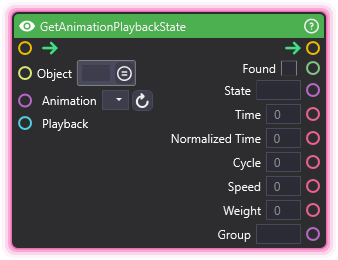
🔍 Full Details & Examples
🔧 How It Works: When triggered, it finds the matching playback - a wired Playback handle reads exactly that playback, otherwise the first playback matching Object + Animation - and writes its live values to the output ports. Found reports whether a match was live; when no playback matches, Found is false, the value outputs are zeroed, and execution still continues.
✨ Perfect For:
- Driving a UI readout from a clip’s normalized time
- Branching a process on whether a clip is currently playing
- Mirroring a playback’s speed or weight onto another object
👉 Inputs:
- (SceneObject) - Object with Animator
Animation(Dropdown) - Clip to read; accepts a wired String clip-name overridePlayback(Handle) - Optional playback handle that takes precedence over Object + Animation; a live handle reads exactly that playback
👈 Outputs:
Found(Boolean) - True when a matching playback was found; false when none matches, in which case the value outputs are zeroedState(String) - Playback state of the matched playback: playing, paused, fading, or heldTime(Float) - Elapsed clip time in secondsNormalized Time(Float) - Normalized clip time; may exceed 1 while loopingCycle(Float) - Raw floor of normalized time: counts legs (not round trips) under PingPong and goes negative under reverse LoopSpeed(Float) - Playback speed multiplierWeight(Float) - Blend weightGroup(String) - Group name recorded on the playback, or empty when it has none
🎬 Streaming Example: “Drive an on-screen progress bar from your intro animation’s normalized time.”
🎯 Tips: Wire the Playback output of PlayAnimation or OnAnimationEvent into Playback to read exactly that playback. Check Found before trusting the values - when nothing matches, the outputs read zero but execution still continues.
OnAnimationEvent
Section titled “OnAnimationEvent”💡 Simple Explanation: Listens for animation playback events from any source and fires the matching trigger - Started, Completed, Stopped, Looped, Paused, or Resumed.
⚙️ Technical Description: Event node that hears playback lifecycle events from every source - graph nodes, direct actions, and transitions - and fires the matching trigger, with optional Object, Animation, and Group filters and data outputs carrying the event’s object, clip, group, and playback handle.
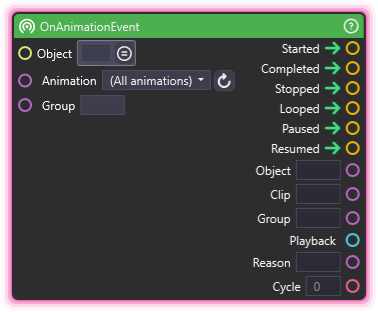
🔍 Full Details & Examples
🔧 How It Works: The node listens from the moment the graph runs; it has no trigger input. Each playback event that passes the filters updates the data outputs first, then fires exactly the matching trigger. Leave Object, Animation, and Group open to hear everything, including clips started outside the graph; set any of them to narrow which playbacks are heard. Reason fills in when Stopped fires and Cycle when Looped fires.
✨ Perfect For:
- Reacting when a clip finishes, no matter what started it
- Chaining a follow-up action every time a loop wraps
- Watching a whole group of playbacks with one node
👉 Inputs:
- (SceneObject) - Optional object filter; only events from this object fire the triggers, and leaving it unset listens to every object
Animation(Dropdown) - Optional clip filter; defaults to (All animations) to listen to every clip; accepts a wired String clip-name overrideGroup(String) - Optional group filter; only events from playbacks recorded with this group name fire the triggers, and leaving it empty matches any group
👈 Outputs:
Started(Trigger) - Fires when a matching playback startsCompleted(Trigger) - Fires when a matching clip reaches its natural endStopped(Trigger) - Fires when a matching playback is stoppedLooped(Trigger) - Fires each time a matching playback completes a loopPaused(Trigger) - Fires when a matching playback pausesResumed(Trigger) - Fires when a matching playback resumesObject(String) - Tag of the scene object the event came fromClip(String) - Clip name the event came fromGroup(String) - Group name recorded on the event’s playback, or empty when it has nonePlayback(Handle) - Playback handle of the event’s session; wire it into a control or transition node to target exactly that playbackReason(String) - Stop reason (explicit, replaced, sceneUnload), populated when Stopped firesCycle(Float) - Completed-cycle count, populated when Looped fires
🎬 Streaming Example: “Fire confetti the moment your celebration clip finishes, even when chat started it through the API.”
🎯 Tips: The data outputs update before the trigger fires, so downstream nodes always read the event that fired them. Filter edits apply at event time - changing them live affects the next event without re-arming. Wire the Playback output into StopAnimation or AnimationTransition to control exactly the playback that raised the event.
OnAnimationMarker
Section titled “OnAnimationMarker”💡 Simple Explanation: Fires its trigger every time a playing clip crosses a chosen position, no matter what started the playback.
⚙️ Technical Description: Event node that watches one clip for crossings of a normalized Position (0 to 1) and fires its trigger on every crossing, from any playback origin, with data outputs for the playback id, object, and completed-cycle count.
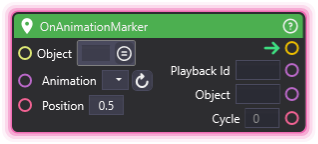
🔍 Full Details & Examples
🔧 How It Works: Pick the Animation and a Position between 0 (start) and 1 (end); the trigger fires each time a playing clip crosses that point, and the node listens from the moment the graph runs with no trigger input. Set Object to watch a single scene object, or leave it unset to watch every object playing that clip. Looping clips fire again each cycle; one-shot clips fire once. Paused or held clips fire nothing, and seeking a clip past the position does not count as a crossing.
✨ Perfect For:
- Syncing a sound or effect to an exact moment in a clip
- Firing once per loop at the same point in every cycle
- Reacting at a precise position to playbacks started outside the graph
👉 Inputs:
- (SceneObject) - Optional object filter; leaving it unset watches every object playing the clip
Animation(Dropdown) - Clip to watch; accepts a wired String clip-name overridePosition(Float) - Normalized clip position to watch, 0 (start) to 1 (end); out-of-range values clamp
👈 Outputs:
Playback Id(String) - Session id of the playback that crossed the positionObject(String) - Tag of the scene object the crossing fired onCycle(Float) - Completed-cycle count of the playback at the crossing
🎬 Streaming Example: “Trigger a camera flash right at the peak of your jump animation.”
🎯 Tips: Position is clip-local, so 0.5 is always the middle of the clip no matter the speed. Under PingPong the watch fires on both the forward and reverse legs of each round trip. Unlike OnAnimationEvent, this node watches exactly one named clip - there is no (All animations) option.