Web
Web nodes connect your graphs to the internet. Use them to call external APIs, react to your stream’s alerts through StreamElements and StreamLabs (and to chat through StreamElements), or send and receive webhooks.
HTTPRequest
Section titled “HTTPRequest”💡 Simple Explanation: Makes web requests to external services and APIs. Like your node graph reaching out to fetch or send data to websites and services.
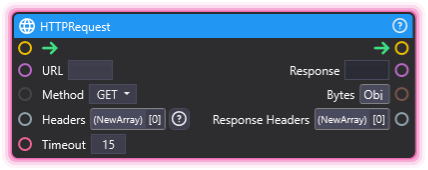
⚙️ Technical Description: Performs asynchronous HTTP requests to external APIs with configurable method, headers, body, and timeout. Timeout is specified in seconds (Float).
🔍 Full Details & Examples
🔧 How It Works: Sends HTTP requests to URLs with customizable methods (GET, POST, etc.), headers, and body data. Waits for the response and outputs the result. Fully asynchronous so it won’t freeze your stream.
✨ Perfect For:
- Fetching data from external APIs
- Sending webhooks to other services
- Custom integrations with third-party platforms
- Triggering external actions from stream events
👉 Inputs:
URL(String) - Full URL to requestMethod(Dropdown) - GET, POST, PUT, PATCH, DELETEBody(String) - Request body (for POST/PUT)Headers(Array) - HTTP headersTimeout(Float) - Timeout in seconds (not milliseconds)
👈 Outputs:
Response(String) - Response textBytes(Bytes) - Raw response dataResponse Headers(Array) - Response headers
🎬 Streaming Example: “When a donation goal is reached, send a POST request to a custom webhook URL to trigger an external light system.”
🎯 Tips: Timeout is in seconds (Float), not milliseconds. Async execution won’t block other nodes. Check response_body for errors. Use with TextParser to extract JSON data.
StreamElementsEventReceiver
Section titled “StreamElementsEventReceiver”💡 Simple Explanation: Listens for your StreamElements events: tips, follows, subs, cheers, raids, chat and more from Twitch, YouTube and Kick. Paste a token, pick an event, and react live.
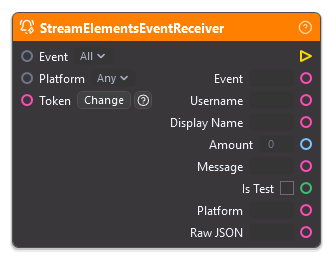
⚙️ Technical Description: UpdaterNode that connects straight to StreamElements’ realtime gateway with a pasted Overlay Token or JWT and fires once per event of the selected type that passes the Platform filter, outputting that event’s fields, then Platform and Raw JSON.
🔍 Full Details & Examples
🔧 How It Works: Paste your token into Token and pick an Event. While your graph runs, the node listens to StreamElements directly, with no sign-in and nothing passing through OverMox’s servers, and fires Trigger once for each event of that type. Platform set to Twitch, YouTube or Kick keeps that platform’s events and the events that name no platform (StreamStatus, Counter and real tips on channel.tips); Any keeps them all. Each Event outputs these fields right after Trigger:
| Event | Fires on | Outputs after Trigger |
|---|---|---|
| All | Every activity (types without an Event of their own included) and every tip | Event, Username, Display Name, Amount, Message |
| Follower | Follows | Username, Display Name |
| Subscriber | Subscriptions on every platform, gifted ones included | Username, Display Name, Months, Streak, Tier, Gifted, Sender, Message |
| Tip | Tips | Username, Amount, Currency, Message |
| Cheer | Twitch Bits cheers | Username, Display Name, Bits, Message |
| CommunityGift | A viewer gifting subs to the community | Sender, Display Name, Count, Tier |
| Raid | Raids | Username, Display Name, Viewers |
| Superchat | YouTube Super Chats and Super Stickers | Username, Display Name, Amount, Currency, Message |
| Membership | YouTube memberships, gifted ones included | Username, Display Name, Tier, Months, Gifted, Sender, Count, Message |
| ChannelPoints | Channel point redemptions | Username, Display Name, Reward, Message |
| HypeTrain | A hype train starting, moving up and ending | Stage, Level, Progress, Total |
| Chat | Each chat message on Twitch, YouTube or Kick | Username, Display Name, User ID, Message, Color, Badges, Message ID |
| StreamStatus | Stream status updates (live or offline) | Is Live |
| Counter | A StreamElements chatbot counter changing | Counter, Value |
Every Event from All through HypeTrain then adds Is Test, and every Event ends with Platform and Raw JSON. A field an event does not carry reads as empty text, 0 or false. YouTube chat and events arrive only from a public stream.
Use the Overlay Token: it reaches every Event, and tips arrive through the activity feed. The JWT Token also works and holds a tip waiting in StreamElements tip moderation until you approve it, but StreamElements marks it private and it expires and changes from time to time, so paste the new one when it does. Each node takes its own token, so nodes with different channels’ tokens run side by side. A missing or rejected token shows as an error in the console.
✨ Perfect For:
- Tip, follow, and sub alerts from Twitch, YouTube, and Kick
- Chat commands and on-screen chat
- Raid, hype train, and channel point celebrations
- Scene changes when your stream goes live
- Chatbot counters driving on-screen scoreboards
👉 Inputs:
Event(Enum) - The event type to listen for, from the table above, or All for every activity and tip. Set it on the node; it does not take a wirePlatform(Enum) - Any, Twitch, YouTube or Kick: keeps that platform’s events and the events that name no platform (StreamStatus, Counter and real tips onchannel.tips), and Any keeps them all. Set it on the node; it does not take a wireToken(String) - Your StreamElements Overlay Token (recommended) or JWT Token, both on the StreamElements dashboard under Account, then Channels (sensitive: OverMox sends it only to StreamElements, never to OverMox’s servers)
👈 Outputs:
Trigger(Trigger) - Fires once per event of the selected type that passes the Platform filterEvent(String) - The activity type as StreamElements names it, such as follow, subscriber, tip or cheer (All)Username(String) - The viewer’s username (every Event except CommunityGift, HypeTrain, StreamStatus and Counter)Display Name(String) - The viewer’s display name (every Event except Tip, HypeTrain, StreamStatus and Counter)Amount(Float) - The amount of a Tip or Superchat in its Currency, and under All whatever amount the activity carries, such as a cheer’s Bits or a raid’s viewers (All, Tip, Superchat)Currency(String) - The currency of the amount (Tip, Superchat)Message(String) - The viewer’s message (All, Subscriber, Tip, Cheer, Superchat, Membership, ChannelPoints, Chat)Months(Integer) - Months subscribed or a member (Subscriber, Membership)Streak(Integer) - Months subscribed in a row (Subscriber)Tier(String) - The subscription or membership tier, such as 1000, 2000, 3000 or prime for a Twitch sub (Subscriber, CommunityGift, Membership)Gifted(Boolean) - True when the subscription or membership was a gift (Subscriber, Membership)Sender(String) - The viewer who gifted it (Subscriber, CommunityGift, Membership)Count(Integer) - How many subs or memberships were gifted (CommunityGift, Membership)Bits(Integer) - The Bits cheered, as a whole number (Cheer)Viewers(Integer) - How many viewers came with the raid (Raid)Reward(String) - The name of the channel point reward (ChannelPoints)Stage(String) - start, progress or end (HypeTrain)Level(Integer) - The hype train’s level (HypeTrain)Progress(Float) - Progress toward the next level, as StreamElements reports it (HypeTrain)Total(Integer) - The hype train’s running total (HypeTrain)User ID(String) - The chatter’s user ID on their platform (Chat)Color(String) - The chatter’s name color as #RRGGBB, empty when the platform sends none (Chat)Badges(String) - The chatter’s badges as a comma list drawn from broadcaster, moderator, vip, subscriber and member (Chat)Message ID(String) - The platform’s ID for the chat message (Chat)Is Live(Boolean) - True while the stream is live (StreamStatus)Counter(String) - The counter’s name (Counter)Value(Integer) - The counter’s new value (Counter)Is Test(Boolean) - True for an alert emulated or replayed from the StreamElements dashboard (every Event from All through HypeTrain)Platform(String) - The platform the event came from: twitch, youtube or kick, or empty when the event names none, as StreamStatus and Counter events and real tips onchannel.tipsdo (every Event)Raw JSON(String) - The StreamElements message as JSON, with a donor’s email and location removed, for any field the other outputs leave out (every Event)
🎬 Streaming Example: “When a viewer cheers 100 Bits or more, fire the gold confetti cannon; smaller cheers get a silver burst.”
🎯 Tips: Keep your token off stream and never share it. Pair Chat’s Message with Comparison for chat commands, and check Is Test with Conditional to keep emulated alerts out of real counts.
StreamLabsEventReceiver
Section titled “StreamLabsEventReceiver”💡 Simple Explanation: Listens for Streamlabs donations, follows, and subs. Perfect for custom Streamlabs alerts.
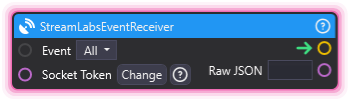
⚙️ Technical Description: UpdaterNode that connects via socket token and monitors Streamlabs events with comprehensive output mapping for donations, follows, subs, and other streaming events.
🔍 Full Details & Examples
🔧 How It Works: Connects via socket token and fires when Streamlabs events occur.
✨ Perfect For:
- Streamlabs donation alerts
- Custom reactions to donations
- Follow and sub notifications
👉 Inputs:
event_type(Enum) - Type of event to listen for (Donation, TwitchFollow, TwitchSub, TwitchCheer, TwitchRaid, YouTubeSub, YouTubeSuperchat), or All for every eventsocket_token(String) - Your Streamlabs Socket API Token from Settings, API Settings, API Tokens (sensitive)
👈 Outputs:
trigger(Trigger) - Fires when the selected event occursname(String) - The viewer’s name (every mode except TwitchRaid and All)message(String) - The viewer’s message (Donation, TwitchSub, TwitchCheer, YouTubeSuperchat)currency(String) - The donation or Super Chat currency (Donation, YouTubeSuperchat)amount(Float) - The donation or Super Chat amount (Donation, YouTubeSuperchat); in TwitchCheer mode it is an Integer holding the bits cheeredmonths(Integer) - Months subscribed (TwitchSub)raiders(Integer) - Number of viewers in the raid (TwitchRaid)json(String) - Raw JSON: the event’s fields, or in All mode the raw payload
🎬 Streaming Example: “Trigger effects when Streamlabs events occur.”
🎯 Tips: Copy your token from the Streamlabs dashboard: open Settings, then API Settings, then the API Tokens tab, and use “Your Socket API Token”, not the API Access Token on the same tab. Set Event to All to fire on every Streamlabs event with the raw payload in Raw JSON. The console shows when the node connects, reconnects or disconnects, and flags a blank or rejected token.
WebHookReceiver
Section titled “WebHookReceiver”💡 Simple Explanation: Receives webhook POST requests. Creates a custom endpoint for external services to trigger.
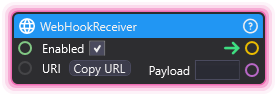
⚙️ Technical Description: UpdaterNode that creates a REST endpoint at /webhooks/{Id} to receive HTTP POST requests and output the payload data.
🔍 Full Details & Examples
🔧 How It Works: Registers an endpoint at /webhook/{id} that accepts POST requests.
✨ Perfect For:
- External triggers
- Custom API integrations
- Third-party callbacks
👉 Inputs:
Enabled(Boolean) - Enable/disable the webhook endpoint (default: true)- (String) - Unique URI path for the webhook endpoint (with Copy URL button)
👈 Outputs:
- (Trigger) - Fires when a POST request is received
Payload(String) - POST body content
🎬 Streaming Example: “Let external service trigger scene changes via webhook.”
🎯 Tips: Endpoint is created at /webhooks/{uri}. Responds with “Success”. Payload contains the POST body.
WebHookSender
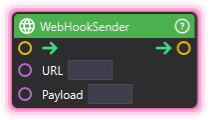
Section titled “WebHookSender”💡 Simple Explanation: Sends webhook POST requests. Triggers external services from your graphs.
⚙️ Technical Description: Coroutine-based node that sends HTTP POST requests with a payload to specified URIs for webhook notifications.
🔍 Full Details & Examples
🔧 How It Works: Sends HTTP POST with payload to specified URL.
✨ Perfect For:
- Triggering external automation
- Notifying other services
- Discord/Slack integrations
👉 Inputs:
URL(String) - URL to send the webhook toPayload(String) - POST body content
👈 Outputs:
- (Trigger) - Fires when the webhook is sent
🎬 Streaming Example: “Send webhook to Discord when donation goal reached.”
🎯 Tips: Simplified POST-only alternative to HTTPRequest. Perfect for Discord webhooks and simple notifications.
WebMonitor
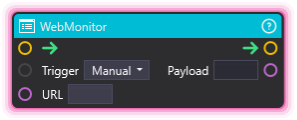
Section titled “WebMonitor”💡 Simple Explanation: Watches a URL for changes. Fires when webpage content updates.
⚙️ Technical Description: UpdaterNode with async scraping that periodically fetches a URL and triggers output when content changes, using ParseTriggerType enum for different monitoring modes.
🔍 Full Details & Examples
🔧 How It Works: Periodically fetches URL and compares content, triggering when it changes.
✨ Perfect For:
- Monitoring APIs
- RSS-like feeds
- Website scraping
👉 Inputs:
trigger_type(Enum) - Type of change detection (ParseTriggerType)uri(String) - URL to monitor
👈 Outputs:
trigger(Trigger) - Fires when content changespayload(String) - Current page content
🎬 Streaming Example: “Monitor API endpoint and trigger effect when new data appears.”
🎯 Tips: Polls periodically. Triggers only when content changes from previous check.