Audio
These 5 nodes handle sound in OverMox. Use them to measure live audio levels for reactive effects, play and stop audio on scene objects, and send or receive MIDI messages from hardware controllers.
DecibelLevel
Section titled “DecibelLevel”💡 Simple Explanation: Measures audio volume in real-time. Creates audio-reactive effects like talking animations, VU meters, and beat-synced visuals.
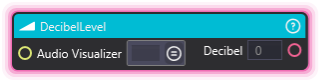
⚙️ Technical Description: UpdaterNode that subscribes to SpectrumDataUpdated events and continuously outputs the current decibel level from an AudioVisualizer component. Behavior varies based on the Audio Visualizer’s Input Source setting.
🔍 Full Details & Examples
🔧 How It Works: Continuously monitors an AudioVisualizer component and outputs the current volume level. The measurement method depends on the Audio Visualizer’s Input Source:
| Input Source Mode | Measurement Method |
|---|---|
| Recording Device | Uses precise GetDecibel() method for accurate dB measurement |
| Playback Device | Uses precise GetDecibel() method for accurate dB measurement |
| Stage Audio Player | Calculates maximum value from spectrum data array |
| All Stage Audio | Calculates maximum value from spectrum data array |
✨ Perfect For:
- Audio-reactive visuals
- VU meters and level displays
- Music visualizers
- Beat detection
- Talking/lip sync animations
- Audio-driven scaling and movement
👉 Inputs:
Audio Visualizer(SceneObject) - Scene object with AudioVisualizer component
👈 Outputs:
Decibel(Float) - Current volume level (continuously updated while the node is active)
🎬 Streaming Examples:
- “Scale particle emission based on music volume.”
- “Make a character’s mouth open wider when you speak louder into your microphone.”
- “Pulse a ring’s scale to the beat of background music.”
🎯 Tips:
- This node continuously updates while active - no need to re-trigger it.
- For voice reactivity (talking animations), set the Audio Visualizer to Recording Device mode.
- For music reactivity (beat sync), set the Audio Visualizer to Playback Device mode to capture desktop audio.
- Pair with Math nodes (Multiply, Remap, Clamp) to map the dB value to visual properties like scale or color.
- The output resets to 0 when the node stops executing.
- If the Audio Visualizer input names no scene object, or one without an Audio Visualizer, the node logs a warning, outputs 0 and keeps running; pointing the input at an object that has one resumes the readings.
- See Audio Visualizer for all available input source modes and settings.
MIDIInput
Section titled “MIDIInput”💡 Simple Explanation: Receives MIDI signals from hardware controllers. Triggers from MIDI devices.
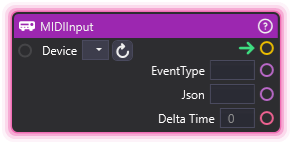
⚙️ Technical Description: UpdaterNode that monitors MIDI device events using DryWetMidi library and outputs event type, JSON payload, and delta time when MIDI messages are received.
🔍 Full Details & Examples
🔧 How It Works: Listens to specified MIDI device and fires when events occur.
✨ Perfect For:
- MIDI controller integration
- Hardware triggers
- Music production integration
- Physical control surfaces
👉 Inputs:
Device(Dropdown) - Name of MIDI input device
👈 Outputs:
EventType(String) - Type of MIDI event (NoteOn, NoteOff, etc.)Json(String) - Full event data in JSON format, with the MIDI library’s field names (NoteNumber, Velocity, AftertouchValue, ControlNumber, ControlValue, ProgramNumber, PitchValue, Channel). Channel reads 1 to 16 and ProgramNumber 1 to 128; EventType is the library’s number (22 NoteOff, 23 NoteOn, 24 NoteAftertouch, 25 ControlChange, 26 ProgramChange, 27 ChannelAftertouch, 28 PitchBend), so compare the EventType output instead.Delta Time(Float) - Time since last event
🎬 Streaming Example: “Trigger effects when pressing keys on MIDI keyboard.”
🎯 Tips: Device must be connected. Great for Stream Deck alternatives. Use the EventType output (a name such as NoteOn) to branch; in the Json, Channel reads 1 to 16.
MIDIOutput
Section titled “MIDIOutput”💡 Simple Explanation: Sends MIDI signals to hardware. Controls MIDI devices from node graphs.
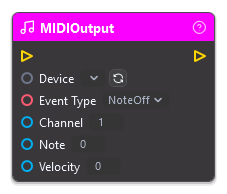
⚙️ Technical Description: Synchronous node that sends one MIDI message per trigger (NoteOff, NoteOn, ControlChange, ProgramChange or PitchBend) to the chosen output device using the DryWetMidi library.
🔍 Full Details & Examples
🔧 How It Works: Sends the chosen Event Type on the chosen Channel. The inputs after Channel change with the Event Type. A value outside its range sends nothing and logs a warning.
✨ Perfect For:
- Controlling MIDI hardware
- DAW integration
- Lighting controllers
- Haptic feedback
👉 Inputs:
Device(Dropdown) - Name of MIDI output deviceEvent Type(Dropdown) - NoteOff, NoteOn, ControlChange, ProgramChange or PitchBend; the inputs after Channel change with itChannel(Integer) - The MIDI channel from 1 to 16, for every Event TypeNote(Integer) - Note number from 0 to 127 (NoteOff, NoteOn)Velocity(Integer) - Velocity from 0 to 127 (NoteOff, NoteOn)Number(Integer) - Controller number from 0 to 127 (ControlChange)Value(Integer) - Controller value from 0 to 127 (ControlChange)Program(Integer) - Program number from 1 to 128, as General MIDI numbers them (ProgramChange)Bend(Integer) - Pitch bend from 0 to 16383, where 8192 is the center (PitchBend)
🎬 Streaming Example: “Send MIDI note to trigger hardware synthesizer when donation occurs.”
🎯 Tips: Channel reads 1 to 16 and Program 1 to 128, the numbers MIDI gear shows. Note, Velocity, Number and Value read 0 to 127, and Bend 0 to 16383 with 8192 at center.
PlaySceneObjectAudio
Section titled “PlaySceneObjectAudio”💡 Simple Explanation: Plays audio on an object. Triggers sound effects.
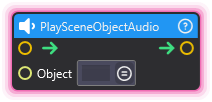
⚙️ Technical Description: Synchronous node that sets the PlayTrigger property on an AudioPlayer3D component to start audio playback.
🔍 Full Details & Examples
🔧 How It Works: Sets PlayTrigger on AudioPlayer3D component to start playback.
✨ Perfect For:
- Sound effects
- Music triggers
- Audio cues
- Dialogue playback
👉 Inputs:
- (SceneObject) - Object with AudioPlayer3D component
🎬 Streaming Example: “Play celebration sound when goal reached.”
🎯 Tips: Requires AudioPlayer3D component on object. Can be retriggered.
StopSceneObjectAudio
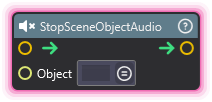
Section titled “StopSceneObjectAudio”💡 Simple Explanation: Stops audio playback on an object. Silences sounds.
⚙️ Technical Description: Synchronous node that sets the StopTrigger property on an AudioPlayer3D component to halt audio playback.
🔍 Full Details & Examples
🔧 How It Works: Sets StopTrigger on AudioPlayer3D to halt playback.
✨ Perfect For:
- Stopping looping sounds
- Audio control
- Muting effects
- Scene transitions
👉 Inputs:
- (SceneObject) - Object with AudioPlayer3D component
🎬 Streaming Example: “Stop background music when scene switches.”
🎯 Tips: Immediately stops audio. Pair with PlaySceneObjectAudio for audio control.