Physics Components
Physics components make objects interact with the physical world - falling with gravity, bouncing off surfaces, and connecting to each other with joints.
Rigidbody
Section titled “Rigidbody”Rigidbody
Section titled “Rigidbody”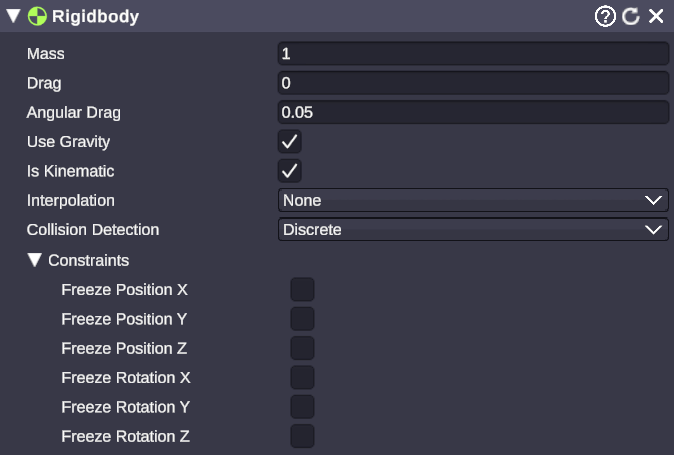
🏷️ Category: Physics
💡 Simple Explanation: Makes an object obey physics - it can fall, bounce, and be pushed around.
⚙️ Technical Description: Adds physics simulation to a scene object, enabling gravity, mass-based forces, velocity, and collision responses through the physics engine.
📖 Full Details & Properties
🔧 How It Works: When you add a Rigidbody, the physics engine takes control of the object’s movement. It will fall due to gravity, respond to forces and collisions, and interact with other physics objects. For the object to collide with things, it also needs a Collider component.
✨ Perfect For:
- Falling objects (donations dropping)
- Throwable items
- Physics-based animations
- Realistic object interactions
📋 Properties:
| Property | Type | Description |
|---|---|---|
| Mass | Float | Weight of the object (affects forces and collisions) |
| Drag | Float | Air resistance slowing linear movement |
| Angular Drag | Float | Resistance slowing rotation |
| Use Gravity | Boolean | Whether gravity affects this object |
| Is Kinematic | Boolean | If true, physics doesn’t move it (but it can push others) |
| Interpolate | Dropdown | Smoothing mode for visual movement |
| Collision Detection | Dropdown | Detection method (Discrete or Continuous) |
| Constraints | Checkboxes | Lock position or rotation on specific axes |
🎬 Streaming Example: “Make donation alerts fall from the top of screen and bounce around before settling.”
🎯 Tips: Use Is Kinematic when you want to move objects with animations but still have them push physics objects. Set Use Gravity to false for floating objects that still respond to forces. Higher Mass means more force needed to move it.
Colliders
Section titled “Colliders”Colliders define the shape used for collision detection. An object needs both a Rigidbody (for physics movement) and a Collider (for collision shape) to fully participate in physics.
Box Collider
Section titled “Box Collider”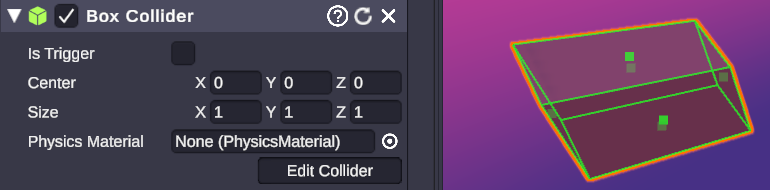
🏷️ Category: Physics
💡 Simple Explanation: A box-shaped collision zone - objects bounce off it like hitting a wall.
⚙️ Technical Description: An axis-aligned box primitive for collision detection, defined by center offset and size dimensions.
📖 Full Details & Properties
🔧 How It Works: Creates an invisible box around (or inside) your object that other physics objects can collide with. The box doesn’t rotate with complex shapes - it stays aligned to the world axes, making it very fast for the physics engine to calculate.
✨ Perfect For:
- Walls and floors
- Simple rectangular objects
- Bounding boxes for complex objects
- Trigger zones
📋 Properties:
| Property | Type | Description |
|---|---|---|
| Is Trigger | Boolean | If true, detects overlaps but doesn’t block movement |
| Material | Physics Material | Surface properties (bounciness, friction) |
| Center | Vector3 | Offset from object’s origin |
| Size | Vector3 | Dimensions of the box (X, Y, Z) |
🎬 Streaming Example: “Create invisible walls to keep bouncing donation objects inside the screen area.”
🎯 Tips: Enable Is Trigger to detect when objects enter a zone without blocking them - great for triggering events. Use a Physics Material with high bounciness for bouncy surfaces.
Sphere Collider
Section titled “Sphere Collider”🏷️ Category: Physics
💡 Simple Explanation: A ball-shaped collision zone - perfect for round objects.
⚙️ Technical Description: A spherical primitive for collision detection, defined by center offset and radius.
📖 Full Details & Properties
🔧 How It Works: Creates an invisible sphere for collision detection. Sphere colliders are the fastest to calculate, making them ideal for performance-critical scenarios or when you have many physics objects.
✨ Perfect For:
- Balls and round objects
- Character capsules (combined with Capsule Collider)
- Simplified collision for complex round shapes
- Fast trigger zones
📋 Properties:
| Property | Type | Description |
|---|---|---|
| Is Trigger | Boolean | If true, detects overlaps but doesn’t block movement |
| Material | Physics Material | Surface properties (bounciness, friction) |
| Center | Vector3 | Offset from object’s origin |
| Radius | Float | Size of the sphere |
🎬 Streaming Example: “Use sphere colliders on bouncing ball alerts for realistic rolling and bouncing physics.”
🎯 Tips: Sphere colliders roll naturally on surfaces. They’re also great for approximate collision on complex objects when exact shapes aren’t needed.
Capsule Collider
Section titled “Capsule Collider”🏷️ Category: Physics
💡 Simple Explanation: A pill-shaped collision zone - great for characters and cylinders.
⚙️ Technical Description: A capsule primitive (cylinder with hemispherical caps) for collision detection, defined by center, radius, height, and orientation axis.
📖 Full Details & Properties
🔧 How It Works: Creates a pill/capsule shape - essentially a cylinder with rounded ends. This shape is excellent for characters because it slides smoothly along surfaces and doesn’t catch on edges like a box would.
✨ Perfect For:
- Characters and avatars
- Bottles and cylindrical objects
- Standing objects that need to tip over smoothly
- Smooth-sliding objects
📋 Properties:
| Property | Type | Description |
|---|---|---|
| Is Trigger | Boolean | If true, detects overlaps but doesn’t block movement |
| Material | Physics Material | Surface properties (bounciness, friction) |
| Center | Vector3 | Offset from object’s origin |
| Radius | Float | Radius of the capsule |
| Height | Float | Total height including rounded caps |
| Direction | Dropdown | Orientation axis (X, Y, or Z) |
🎬 Streaming Example: “Give your animated mascot a capsule collider so it bounces off walls smoothly without getting stuck on corners.”
🎯 Tips: The Height includes the hemispherical caps - the cylindrical portion is Height - (2 * Radius). Set Direction to Y-Axis for upright characters.
Mesh Collider
Section titled “Mesh Collider”🏷️ Category: Physics
💡 Simple Explanation: Uses the object’s actual 3D shape for collision - most accurate but slowest.
⚙️ Technical Description: Uses arbitrary mesh geometry for collision detection, with optional convex hull simplification for Rigidbody compatibility.
📖 Full Details & Properties
🔧 How It Works: Instead of a simple shape, the Mesh Collider uses the actual geometry of a mesh for collision. This gives pixel-perfect collision detection but is much more expensive to calculate. For objects with a Rigidbody, the mesh must be marked as Convex (simplified to a convex hull).
✨ Perfect For:
- Static environment geometry (walls, floors, terrain)
- Complex shapes where simple colliders aren’t accurate enough
- Detailed collision on important objects
📋 Properties:
| Property | Type | Description |
|---|---|---|
| Is Trigger | Boolean | If true, detects overlaps but doesn’t block movement |
| Material | Physics Material | Surface properties (bounciness, friction) |
| Mesh | Mesh | The mesh to use for collision |
| Convex | Boolean | Simplify to convex hull (required for Rigidbody) |
🎬 Streaming Example: “Use mesh colliders on your detailed virtual set pieces so objects bounce off them accurately.”
🎯 Tips: Use simple colliders (Box, Sphere, Capsule) whenever possible - they’re much faster. Only use Mesh Collider when accuracy is essential. Non-convex mesh colliders can’t be used on objects with Rigidbody.
Joints
Section titled “Joints”Joints connect two objects together, constraining how they can move relative to each other. At least one of the connected objects must have a Rigidbody.
Fixed Joint
Section titled “Fixed Joint”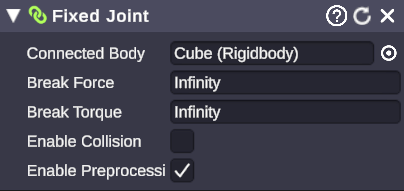
🏷️ Category: Physics
💡 Simple Explanation: Welds two objects together so they move as one piece.
⚙️ Technical Description: A joint that rigidly connects two Rigidbodies, maintaining their relative positions and rotations until broken by sufficient force.
📖 Full Details & Properties
🔧 How It Works: Fixed joints act like a weld - the connected objects move together as if they were one solid piece. However, unlike parenting, they’re still separate physics objects and can break apart if enough force is applied.
✨ Perfect For:
- Breakable connections
- Temporary attachments
- Stacking objects that can collapse
- “Glued” objects that break on impact
📋 Properties:
| Property | Type | Description |
|---|---|---|
| Connected Body | Rigidbody | The other object to connect to |
| Break Force | Float | Force required to break the joint (Infinity = unbreakable) |
| Break Torque | Float | Rotational force required to break the joint |
🎬 Streaming Example: “Stack donation boxes that break apart dramatically when something hits them.”
🎯 Tips: Set Break Force and Break Torque to Infinity for permanent connections. Lower values create more fragile connections that break easily.
Hinge Joint
Section titled “Hinge Joint”🏷️ Category: Physics
💡 Simple Explanation: Creates a rotating connection like a door hinge or wheel axle.
⚙️ Technical Description: A joint that constrains two Rigidbodies to rotate around a shared axis, with optional angle limits, spring behavior, and motor force.
📖 Full Details & Properties
🔧 How It Works: Hinge joints allow rotation around a single axis, like a door on its hinges. You can limit the rotation angle, add spring resistance, or apply a motor to automatically rotate the joint.
✨ Perfect For:
- Doors and gates
- Swinging signs
- Pendulums
- Wheels and propellers
- Flapping elements
📋 Properties:
| Property | Type | Description |
|---|---|---|
| Connected Body | Rigidbody | The other object to connect to |
| Anchor | Vector3 | Position of the hinge pivot point |
| Axis | Vector3 | Direction of the rotation axis |
| Use Spring | Boolean | Enable spring behavior |
| Spring | Settings | Spring force and damper values |
| Use Motor | Boolean | Enable automatic rotation |
| Motor | Settings | Target velocity and force |
| Use Limits | Boolean | Enable rotation limits |
| Limits | Settings | Minimum and maximum angles |
🎬 Streaming Example: “Create a spinning wheel of fortune that viewers can trigger with donations.”
🎯 Tips: Use Motor with a target velocity to create continuously spinning objects. Enable Use Limits for doors that should only swing open so far. The Spring setting makes the joint bounce back to a rest position.
Spring Joint
Section titled “Spring Joint”🏷️ Category: Physics
💡 Simple Explanation: Creates a stretchy, elastic connection like a bungee cord or rubber band.
⚙️ Technical Description: A joint that connects two Rigidbodies with spring-like behavior, allowing stretching and compression with configurable spring strength and distance limits.
📖 Full Details & Properties
🔧 How It Works: Spring joints create an elastic connection between objects. They try to maintain a rest distance, but can stretch or compress. The connected objects will oscillate and bounce before settling, like objects connected by a spring or rubber band.
✨ Perfect For:
- Bouncy connections
- Elastic ropes and chains
- Wobbly attachments
- Suspension effects
- Jiggly connections
📋 Properties:
| Property | Type | Description |
|---|---|---|
| Connected Body | Rigidbody | The other object to connect to |
| Anchor | Vector3 | Connection point on this object |
| Connected Anchor | Vector3 | Connection point on the other object |
| Spring | Float | Spring strength (higher = stiffer) |
| Damper | Float | Dampening (higher = less oscillation) |
| Min Distance | Float | Minimum stretch distance |
| Max Distance | Float | Maximum stretch distance |
🎬 Streaming Example: “Hang donation alerts from springs so they bounce and wobble when they appear.”
🎯 Tips: Higher Spring values make stiffer connections. Higher Damper values reduce bouncing. Set Min Distance and Max Distance to limit how far the spring can stretch or compress.