Project Variables
Variables let you store data that persists across your node graphs and throughout your streaming session. Use them to track donation totals, store viewer names, count events, and share data between different parts of your project.
What Are Variables?
Section titled “What Are Variables?”Variables are named containers that hold values. Instead of hardcoding a number or text, you store it in a variable and reference it by name. This lets you:
- Track state - Count donations, track scores, store usernames
- Share data - One node graph can set a value that another reads
- Update dynamically - Change values at runtime based on events
- Persist across graphs - Variables live at the project level, not individual graphs
Variable Types
Section titled “Variable Types”Variables can hold different types of data:
| Type | Description | Example |
|---|---|---|
| Integer | Whole numbers | 42, -5, 0 |
| Float | Decimal numbers | 3.14, -0.5, 100.0 |
| Boolean | True or false | true, false |
| String | Text | "Hello", "ViewerName" |
| Vector2 | 2D coordinates | (100, 200) |
| Vector3 | 3D coordinates | (0, 5, -10) |
| Color | RGBA color values | Red, Blue, custom colors |
| Array | Lists of values | [1, 2, 3], ["a", "b", "c"] |
The variable type is set when you create it and cannot be changed afterward.
Creating Variables
Section titled “Creating Variables”In the Variables Panel
Section titled “In the Variables Panel”- Open the Variables panel
- Click “Add Variable”
- Enter a name
- Choose the variable type
- Set an initial value
With Node Graphs
Section titled “With Node Graphs”Use the Create Variable node to create variables dynamically:
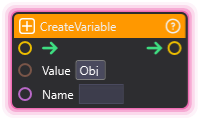
This is useful for initializing variables when your stream starts.
Using Variables in Node Graphs
Section titled “Using Variables in Node Graphs”Reading Variables
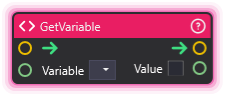
Section titled “Reading Variables”Use the Get Variable node to read a variable’s current value:
Writing Variables
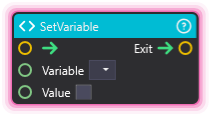
Section titled “Writing Variables”Use the Set Variable node to update a variable:
Common Pattern: Read-Modify-Write
Section titled “Common Pattern: Read-Modify-Write”Most variable updates follow this pattern:
- Get the current value with Get Variable
- Modify it (add, subtract, append, etc.) with Math nodes
- Set the new value back with Set Variable
Variable Scope
Section titled “Variable Scope”Project Variables
Section titled “Project Variables”Variables created in the Variables panel or through nodes are project-level:
- Accessible from any node graph in your project
- Persist throughout your streaming session
- Shared between OverMox and the node graph editor
Session Lifetime
Section titled “Session Lifetime”Variables persist as long as OverMox is running. When you close and reopen OverMox:
- Variables defined in the Variables panel are restored
- Variables created dynamically by nodes need to be recreated
Arrays
Section titled “Arrays”Arrays are special variables that hold lists of values. They’re essential for:
- Leaderboards (list of names and scores)
- Queues (list of pending requests)
- Collections (all donation amounts)
See Variables Nodes for complete array operations:
| Node | Purpose |
|---|---|
| Array Creator | Create a new array |
| Add Array Item | Add items to an array |
| Get Array Item | Read a specific item |
| Set Array Item | Change a specific item |
| Get Array Size | Count items in array |
| For Each Array Item | Loop through all items |
| Clear Array | Empty an array |
Best Practices
Section titled “Best Practices”Naming Conventions
Section titled “Naming Conventions”Use clear, descriptive names:
| Good | Bad |
|---|---|
total_donations |
td |
current_viewer_name |
name |
alert_queue |
arr1 |
is_live |
x |
Initialize Early
Section titled “Initialize Early”Create variables at stream start (using a Start Process node) to ensure they exist before other graphs try to use them.
Use Appropriate Types
Section titled “Use Appropriate Types”Choose the right type for your data:
- Use Integer for counts and whole numbers
- Use Float for amounts with decimals
- Use Boolean for on/off states
- Use String for text and names
- Use Array for lists of related items
🎯 Check Before Use: If a graph might run before a variable is created, handle the case where it doesn’t exist yet.
🎯 Reset Between Streams: Clear counters and queues at stream start for fresh data each session.
🎯 Use Arrays for Related Data: Instead of donor1, donor2, donor3, use a single donors array.
🎯 Name Consistently: Pick a naming style (like snake_case) and stick with it throughout your project.
🎯 Document Purpose: If you have many variables, keep notes about what each one tracks.
Related
Section titled “Related”- Variables Nodes - All nodes for working with variables
- Flow Nodes - Logic and control flow
- Math Nodes - Mathematical operations for variable values