Variable Nodes
Variable nodes store data that persists while your graphs run. Create named values and arrays, read and update them from any graph, and loop over collections like leaderboards or viewer queues.
AddArrayItem
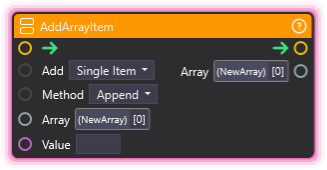
Section titled “AddArrayItem”💡 Simple Explanation: Adds new items into an existing array. Like adding a name to a guest list or inserting an item into a specific position in a lineup.
⚙️ Technical Description: Adds one or more items to an array, either appending to the end or inserting at a specified index. Supports adding single values or entire arrays.
🔍 Full Details & Examples
🔧 How It Works: Takes an array and adds either a single value or multiple values from another array. You can append items to the end or insert them at a specific position. The array is modified and outputted for use in subsequent nodes.
✨ Perfect For:
- Building leaderboards by adding new entries as they come in
- Collecting donation amounts in real-time
- Maintaining lists of recent subscribers or chat messages
- Inserting priority items at specific positions
👉 Inputs:
Add(Dropdown) - “Single Item” or “Array”Method(Dropdown) - “Append” or “Insert”- (Array) - Array to modify
Value(varies) - Item to add (matches array type)
👈 Outputs:
- (Array) - Modified array with new item(s)
🎬 Streaming Example: “Every time someone donates, add their username to a ‘Top Donors’ array, then display the updated list on screen.”
🎯 Tips: When inserting arrays, the source and target must have matching variable types. Index starts at 0. Append is fastest for building lists sequentially.
AddArrayRow
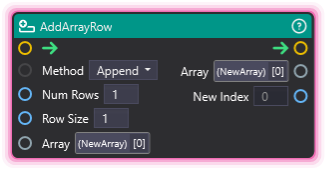
Section titled “AddArrayRow”💡 Simple Explanation: Adds new rows to a table-like 2D array. Like adding blank lines to a spreadsheet where each row has the same number of columns.
⚙️ Technical Description: Adds one or more rows to a 2D array with validation to ensure row size consistency. Can append or insert at a specific index, returning the starting index of new rows.
🔍 Full Details & Examples
🔧 How It Works: Creates new rows with the specified size (number of columns) and adds them to the 2D array. All rows must have the same size, which is validated. Returns the index where the new rows start.
✨ Perfect For:
- Building leaderboard tables with multiple columns (rank, name, score)
- Creating grids of data for display purposes
- Managing multi-dimensional scene state (inventory grids, etc.)
- Structured data that needs rows and columns
👉 Inputs:
Method(Dropdown) - “Append” or “Insert”Num Rows(Integer) - How many rows to addRow Size(Integer) - Number of columns per row- (Array) - 2D array to modify
👈 Outputs:
- (Array) - Modified 2D array
New Index(Integer) - Starting index of added rows
🎬 Streaming Example: “When setting up a donation leaderboard, add 10 rows with 3 columns each (rank, username, amount) to store the top donors.”
🎯 Tips: Row size must match existing rows or the node will error. New rows are initialized with default values for the array’s type. Use with ForEachArrayItem to populate data.
ContainsArrayItem
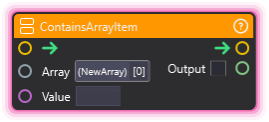
Section titled “ContainsArrayItem”💡 Simple Explanation: Checks if a specific value is anywhere in an array. Like seeing if someone’s name is on the guest list.
⚙️ Technical Description: Searches an array for a specific value and returns whether it exists. Supports Integer, Float, Boolean, String, Generic, and Vector types.
🔍 Full Details & Examples
🔧 How It Works: Searches through every item in the array looking for an exact match with the value you provide. Returns true if found, false otherwise. Works with all standard variable types.
✨ Perfect For:
- Checking if a username is in a ban list
- Validating if a donation amount has already been processed
- Seeing if a specific item exists before adding duplicates
- Conditional logic based on array membership
👉 Inputs:
array_input(Array) - Array to searchvalue(varies) - Value to look for (type matches array)
👈 Outputs:
output(Boolean) - True if value is found, false otherwise
🎬 Streaming Example: “Before adding a viewer to the VIP list, check if they’re already in the array to avoid duplicates.”
🎯 Tips: Performs exact matching. For Vectors, compares all three components (X, Y, Z). Use with Conditional node to branch based on result.
ForEachArrayItem
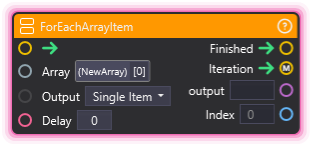
Section titled “ForEachArrayItem”💡 Simple Explanation: Loops through an array one item at a time, letting you do something with each item. Like reading names off a list one by one with optional pauses.
⚙️ Technical Description: Iterates through each element in an array sequentially using a coroutine, with optional delay between iterations. Provides separate execution outputs for each iteration and completion.
🔍 Full Details & Examples
🔧 How It Works: Goes through the array from start to finish, triggering the iteration output for each element. You get access to the current item and its index. After all items are processed, the finished output fires. Optional delay creates pauses between iterations.
✨ Perfect For:
- Displaying donation messages one at a time with delays
- Processing a queue of viewer requests sequentially
- Animating items from a list with spacing between each
- Batch operations that need to happen in sequence
👉 Inputs:
- (Array) - Array to loop through
Output(Dropdown) - “Single Item” or “Array”Delay(Float) - Seconds to wait between iterations (0 for instant)
👈 Outputs:
Finished- Fires when all items are doneIteration- Fires for each array itemoutput(varies) - Current item’s valueIndex(Integer) - Current position in array
🎬 Streaming Example: “When displaying top 5 donors, use ArrayForEach with a 1-second delay to reveal each name one at a time with a tween animation.”
🎯 Tips: The Iteration path executes for each item, while Finished runs once at the end. Set Delay to 0 for instant processing. Great for creating sequential animations or timed reveals.
GetArraySize
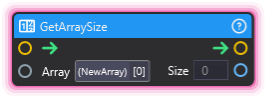
Section titled “GetArraySize”💡 Simple Explanation: Counts how many items are in an array. Like checking how many names are on your list.
⚙️ Technical Description: Returns the number of elements (rows) in an array.
🔍 Full Details & Examples
🔧 How It Works: Reads the array and outputs the total number of elements it contains. For 2D arrays, this is the number of rows (not individual cells).
✨ Perfect For:
- Checking if an array has data before processing
- Setting loop limits based on array size
- Displaying item counts (e.g., “5 viewers in queue”)
- Conditional logic based on array length
👉 Inputs:
- (Array) - Array to measure
👈 Outputs:
Size(Integer) - Number of elements in array
🎬 Streaming Example: “Before displaying the donation leaderboard, check the array size to see if there are any donors to show.”
🎯 Tips: Returns 0 for empty arrays. For 2D arrays, counts rows not cells. Useful with Conditional to check if arrays are empty.
IndexOfArrayItem
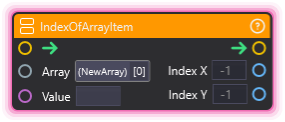
Section titled “IndexOfArrayItem”💡 Simple Explanation: Finds where a specific value is located in an array. Like finding which position a name appears in a numbered list.
⚙️ Technical Description: Searches an array for a specific value and returns its position. For 2D arrays, returns both row (X) and column (Y) indices. Returns -1 if not found.
🔍 Full Details & Examples
🔧 How It Works: Searches through the array looking for an exact match, then returns the position where it was found. For 1D arrays, index_x is the position. For 2D arrays, index_x is the row and index_y is the column. Returns -1 for both if the value doesn’t exist.
✨ Perfect For:
- Finding a viewer’s position in a leaderboard
- Locating specific data before updating or removing it
- Determining rank or placement in lists
- Conditional branching based on item location
👉 Inputs:
array_input(Array) - Array to searchvalue(varies) - Value to locate (type matches array)
👈 Outputs:
index_x(Integer) - Row index or 1D position (-1 if not found)index_y(Integer) - Column index for 2D arrays (-1 if not found)
🎬 Streaming Example: “When a viewer donates, find their position in the Top Donors array and highlight their row with a special effect.”
🎯 Tips: Index starts at 0 (first item = index 0). Check if index_x is -1 to know if the search failed. Returns the first match if there are duplicates.
ClearArray
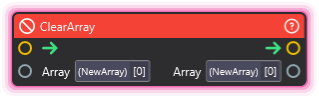
Section titled “ClearArray”💡 Simple Explanation: Empties an array completely. Like erasing everything from a whiteboard to start fresh.
⚙️ Technical Description: Removes all elements from an array, resizing it to zero length.
🔍 Full Details & Examples
🔧 How It Works: Takes an array and removes every single item from it, leaving you with an empty array of size 0. The array still exists, just with no contents.
✨ Perfect For:
- Resetting leaderboards at the start of a new stream
- Clearing viewer queues after processing
- Starting fresh with empty data structures
- Bulk deletion when you don’t need individual removals
👉 Inputs:
array_input(Array) - Array to empty
👈 Outputs:
array_output(Array) - Same array, now empty
🎬 Streaming Example: “At the end of each hour, clear the ‘recent donations’ array to start tracking a new hour’s donations.”
🎯 Tips: Faster than removing items one by one. The array variable still exists afterward, just empty. Use ArrayGetSize after to confirm it’s 0.
CopyArray
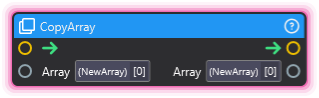
Section titled “CopyArray”💡 Simple Explanation: Makes a duplicate of an array. Like photocopying a list so you can modify one version while keeping the original intact.
⚙️ Technical Description: Creates a shallow copy of an array, duplicating the list structure but not deep-copying nested objects.
🔍 Full Details & Examples
🔧 How It Works: Takes an existing array and creates a new independent copy with the same contents. Changes to the copy won’t affect the original array and vice versa.
✨ Perfect For:
- Preserving a snapshot of data before modifying it
- Creating backup versions of leaderboards or lists
- Testing changes without affecting the original
- Splitting workflows that need separate array versions
👉 Inputs:
array_input(Array) - Array to duplicate
👈 Outputs:
array_output(Array) - New array with copied contents
🎬 Streaming Example: “Before shuffling the viewer queue randomly, copy it first so you can restore the original order if needed.”
🎯 Tips: Creates a new independent array - modifying one won’t change the other. Shallow copy means nested objects are still referenced, not duplicated. Fast operation.
ArrayCreator
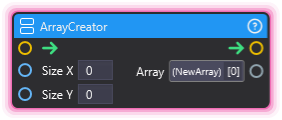
Section titled “ArrayCreator”💡 Simple Explanation: Creates a brand new empty array with a specific size. Like setting up a blank table with a set number of rows and columns.
⚙️ Technical Description: Creates a new array with specified X and Y dimensions. Size_x determines rows, size_y determines columns for each row.
🔍 Full Details & Examples
🔧 How It Works: Takes two size values and creates an array structure. For 1D arrays, set size_y to 1. For 2D arrays, size_x is the number of rows and size_y is the number of columns. All cells are initialized with default values.
✨ Perfect For:
- Setting up leaderboard tables with predefined size
- Creating fixed-size data structures at graph start
- Initializing grids or matrices for scene state
- Pre-allocating space for known data quantities
👉 Inputs:
Size X(Integer) - Number of rowsSize Y(Integer) - Number of columns per row
👈 Outputs:
- (Array) - Newly created array
🎬 Streaming Example: “At stream start, create a 10x3 array to hold leaderboard data: 10 rows for top donors, 3 columns for rank/name/amount.”
🎯 Tips: Both sizes must be >= 0 or you’ll get a warning. Arrays are initialized with default values for the array’s type. Use with AddArrayItem or SetArrayItem to populate data.
CreateVariable
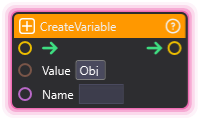
Section titled “CreateVariable”💡 Simple Explanation: Creates a new named variable that can be used throughout your node graphs. Like declaring a variable in code that you can get and set later.
⚙️ Technical Description: Creates a new variable in the NodeGraph variable system and registers it with the manager. Variable type is automatically inferred from the initial value provided.
🔍 Full Details & Examples
🔧 How It Works: Takes a name and an initial value, then creates a new variable that persists across the session. The variable’s type (int, string, float, etc.) is determined by what value you provide. Other nodes can then access this variable by name.
✨ Perfect For:
- Storing stream session data (total donations, viewer count)
- Creating counters that persist across multiple triggers
- Sharing data between different node graphs
- Dynamic variable creation based on runtime conditions
👉 Inputs:
Name(String) - Unique variable nameValue(varies) - Initial value (determines type)
🎬 Streaming Example: “When stream starts, create a variable named ‘total_donations’ with value 0, then increment it every time someone donates.”
🎯 Tips: Variable names must be unique. Type is locked based on initial value. Use GetVariable to read values and update them with math or other operations. Variables persist until manually deleted or session ends.
DeleteVariable
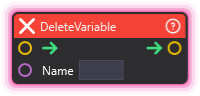
Section titled “DeleteVariable”💡 Simple Explanation: Deletes a variable completely. Like removing a variable from memory when you’re done with it.
⚙️ Technical Description: Removes a variable from the NodeGraph variable system and notifies the OverMoxController to update the UI.
🔍 Full Details & Examples
🔧 How It Works: Takes a variable name and permanently removes it from the system. The variable and all its data are gone - other nodes can no longer access it.
✨ Perfect For:
- Cleaning up temporary variables after use
- Resetting state by removing old session data
- Memory management for long-running streams
- Dynamic variable lifecycle management
👉 Inputs:
Variable(Dropdown) - Variable to delete
🎬 Streaming Example: “At the end of each hour, delete the ‘hourly_sub_count’ variable to prepare for the next hour’s tracking.”
🎯 Tips: Make sure nothing else needs this variable before deleting. No error if variable doesn’t exist. Use carefully as deletion is permanent for the session.
GetArrayItem
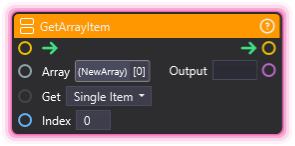
Section titled “GetArrayItem”💡 Simple Explanation: Gets a specific item from an array by its position number. Like pulling the 3rd name from a list.
⚙️ Technical Description: Retrieves a value or row from an array by index. Handles out-of-bounds access gracefully.
🔍 Full Details & Examples
🔧 How It Works: Takes an array and an index number, then returns the value at that position. For 2D arrays, returns an entire row. Returns empty/default if the index is out of bounds.
✨ Perfect For:
- Retrieving specific leaderboard entries
- Getting data from stored lists
- Accessing calculated or stored values by position
- Reading individual elements for processing
👉 Inputs:
- (Array) - Array to read from
Get(Dropdown) - “Single Item” or “Array”Index(Integer) - Position to retrieve (0-based)
👈 Outputs:
Output(varies) - Value at that index
🎬 Streaming Example: “Get the top donor’s name by retrieving index 0 from the sorted donations array.”
🎯 Tips: Index starts at 0. Handles out-of-bounds gracefully (no crash). For 2D arrays, gets the entire row at index_x.
GetVariable
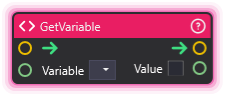
Section titled “GetVariable”💡 Simple Explanation: Reads the current value of a saved variable. Like checking what number is stored in a counter.
⚙️ Technical Description: Retrieves the current value of a named variable from the NodeGraph variable system. Logs a warning if the variable doesn’t exist.
🔍 Full Details & Examples
🔧 How It Works: Takes a variable name and outputs its current value. The value type matches whatever type was set when the variable was created. Logs a warning if the variable doesn’t exist.
✨ Perfect For:
- Reading counter values for display
- Checking conditions based on stored data
- Passing variable data to other nodes
- Building dynamic content from saved state
👉 Inputs:
Variable(Dropdown) - Variable to read
👈 Outputs:
Value(varies) - Current value of the variable
🎬 Streaming Example: “Read the ‘total_donations’ variable and display it in a text overlay that updates in real-time.”
🎯 Tips: Make sure the variable exists before reading. Use with CreateVariable at startup to ensure variables are initialized.
SetArrayItem
Section titled “SetArrayItem”💡 Simple Explanation: Changes a specific item in an array by its position. Like editing the 3rd name on a list without affecting the others.
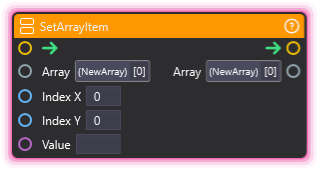
⚙️ Technical Description: Sets a value at a specific index in an array. For 2D arrays, can specify both row (X) and column (Y) indices.
🔍 Full Details & Examples
🔧 How It Works: Takes an array, an index position, and a new value, then replaces the value at that position. For 2D arrays, you can specify both X (row) and Y (column) indices.
✨ Perfect For:
- Updating leaderboard entries
- Modifying specific data points
- Editing table cells
- Replacing outdated values
👉 Inputs:
- (Array) - Array to modify
Index X(Integer) - Row index or 1D position (0-based)Index Y(Integer) - Column index for 2D arraysValue(varies) - New value to set (type matches array)
👈 Outputs:
- (Array) - Modified array
🎬 Streaming Example: “When a viewer beats the high score, update the leaderboard by setting the score at their position to the new value.”
🎯 Tips: Index starts at 0. Make sure the index is within bounds. Use with GetArraySize to validate indices before setting.
SetVariable
Section titled “SetVariable”💡 Simple Explanation: Changes the value of an existing variable. Like updating the number on a counter.
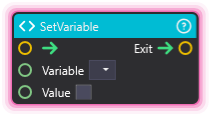
⚙️ Technical Description: Updates the value of a named variable in the NodeGraph variable system. The variable must already exist.
🔍 Full Details & Examples
🔧 How It Works: Takes a variable name and a new value, then updates the variable to store that value. The variable must already exist (created with CreateVariable).
✨ Perfect For:
- Updating counters and totals
- Saving state changes
- Storing calculated results
- Tracking progress
👉 Inputs:
Variable(Dropdown) - Variable to updateValue(varies) - New value to store
👈 Outputs:
Exit- Fires when variable is set
🎬 Streaming Example: “After calculating the new donation total with Math nodes, use SetVariable to save the updated amount back to the ‘total_donations’ variable.”
🎯 Tips: Variable must exist before you can set it. Use with GetVariable to read, modify with Math nodes, then set the new value back.
ArrayResizer
Section titled “ArrayResizer”💡 Simple Explanation: Changes the size of a 2D array. Make it bigger or smaller by specifying new dimensions.
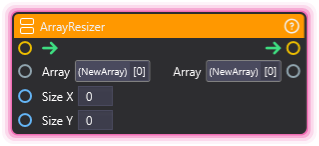
⚙️ Technical Description: Resizes a 2D array (matrix) to the specified X and Y dimensions, preserving existing data where possible.
🔍 Full Details & Examples
🔧 How It Works: Takes a 2D array and resizes it to new dimensions. Existing values within bounds are preserved; new cells are initialized empty.
✨ Perfect For:
- Expanding data tables dynamically
- Shrinking arrays to remove unused space
- Preparing arrays for new data
- Matrix operations
👉 Inputs:
Array Input(Array) - The 2D array to resizeSize X(Integer) - New number of rowsSize Y(Integer) - New number of columns
👈 Outputs:
Array Output(Array) - The resized array
🎬 Streaming Example: “Expand the leaderboard array from 5 to 10 rows when more viewers join the competition.”
🎯 Tips: Data outside new bounds is lost. Initialize new cells after resizing if needed.
RemoveArrayItem
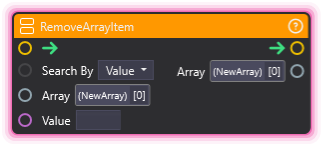
Section titled “RemoveArrayItem”💡 Simple Explanation: Removes an item from an array by its value or position.
⚙️ Technical Description: Removes an element from a 1D array either by searching for a matching value or by specifying an index position.
🔍 Full Details & Examples
🔧 How It Works: Finds and removes an item from the array. Can search by value (removes first match) or by index (removes at position).
✨ Perfect For:
- Removing items from lists
- Deleting entries from queues
- Cleaning up data
- Managing dynamic collections
👉 Inputs:
Search By(Dropdown) - “Value” or “Index”Array Input(Array) - Array to modifyValue(String) - Value to find, or index number if searching by index
👈 Outputs:
Array Output(Array) - Array with item removed
🎬 Streaming Example: “Remove a viewer’s name from the raffle list after they win.”
🎯 Tips: When searching by value, only first match is removed. Index is 0-based. Check array size before removing by index.
RemoveArrayRow
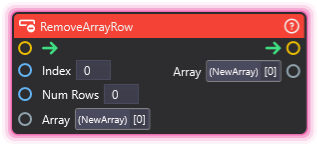
Section titled “RemoveArrayRow”💡 Simple Explanation: Removes one or more rows from a 2D array.
⚙️ Technical Description: Removes a specified number of rows from a 2D array starting at a given index position.
🔍 Full Details & Examples
🔧 How It Works: Deletes rows from a 2D array. Specify the starting row index and how many rows to remove.
✨ Perfect For:
- Removing entries from tables
- Cleaning up old data rows
- Managing 2D data structures
- Trimming leaderboards
👉 Inputs:
Index(Integer) - Starting row to remove (0-based)Num Rows(Integer) - Number of rows to deleteArray Input(Array) - 2D array to modify
👈 Outputs:
Array Output(Array) - Array with rows removed
🎬 Streaming Example: “Remove the bottom 3 entries from a leaderboard when trimming to top 10.”
🎯 Tips: Index is 0-based. Remaining rows shift up to fill the gap. Check bounds before removing.