Hardware
Hardware nodes connect OverMox to physical control surfaces. Use them to fire graph triggers from Elgato Stream Deck buttons and dials, and to push live feedback back to the device.
StreamDeck
Section titled “StreamDeck”💡 Simple Explanation: Integrates Elgato Stream Deck. Triggers from Stream Deck buttons and dials.
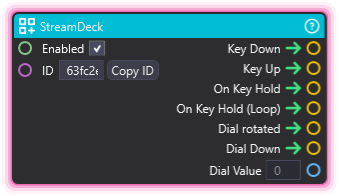
⚙️ Technical Description: UpdaterNode that creates a webhook endpoint at /streamdeck/webhooks/{id} and outputs separate triggers for key down/up/hold, dial rotation/press events with rotation values.
🔍 Full Details & Examples
🔧 How It Works: Registers webhook for Stream Deck plugin, fires events for buttons/dials.
✨ Perfect For:
- Stream Deck control
- Custom streaming controls
- Hardware automation
👉 Inputs:
Enabled(Boolean) - Enable/disable the node (default: true)ID(String) - Identifier used in the webhook endpoint path
👈 Outputs:
Key Down(Trigger) - Button pressedKey Up(Trigger) - Button releasedOn Key Hold(Trigger) - Button heldOn Key Hold (Loop)(Trigger) - Button held continuouslyDial rotated(Trigger) - Dial rotatedDial Down(Trigger) - Dial pressedDial Value(Integer) - Dial rotation amount
🎬 Streaming Example: “Press Stream Deck button to trigger scene change.”
🎯 Tips: Requires Stream Deck plugin setup. Supports buttons and dials. Great hardware integration.
StreamDeckButtonEditor
Section titled “StreamDeckButtonEditor”💡 Simple Explanation: Updates Stream Deck button appearance. Dynamic button feedback.
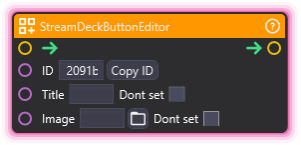
⚙️ Technical Description: Synchronous node that sends WebSocket messages to update Stream Deck button properties (title, image) in real-time.
🔍 Full Details & Examples
🔧 How It Works: Sends WebSocket message to update button title/image on Stream Deck.
✨ Perfect For:
- Dynamic button states
- Status indicators
- Visual feedback
👉 Inputs:
ID(String) - ID of the button to updateTitle(String) - New button title textImage(String) - Path to image for button
🎬 Streaming Example: “Update button to show ‘LIVE’ when streaming starts.”
🎯 Tips: Changes button visuals in real-time. Great for state feedback.