Generators
These 2 nodes produce values for the rest of your graph. Use RandomNumberGenerator for dice rolls and giveaways, and WaveGenerator for pulsing, oscillating motion over time.
RandomNumberGenerator
Section titled “RandomNumberGenerator”💡 Simple Explanation: Creates a random number between two values. Like rolling dice or picking a random winner.
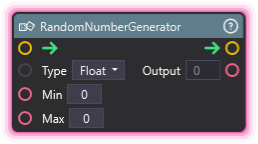
⚙️ Technical Description: Generates random numbers within a specified range. Supports both Float and Integer output types.
🔍 Full Details & Examples
🔧 How It Works: Takes a minimum and maximum value, then generates a random number in that range. Choose Float for decimal numbers or Integer for whole numbers only.
✨ Perfect For:
- Picking random viewers for giveaways
- Creating varied effect timings
- Randomizing spawn positions or properties
- Adding unpredictability to animations or events
👉 Inputs:
Type(Dropdown) - Float or IntegerMin(Float) - Lowest possible valueMax(Float) - Highest possible value
👈 Outputs:
Output(Float) - Random number in range
🎬 Streaming Example: “When someone donates, generate a random number 1-100. If it’s above 95, trigger a rare special effect.”
🎯 Tips: Integer mode uses whole numbers only. Max is inclusive for integers, exclusive for floats. Each execution generates a new random value.
WaveGenerator
Section titled “WaveGenerator”💡 Simple Explanation: Creates smoothly changing values that go up and down in patterns. Like a heartbeat monitor or pulsing light effect.
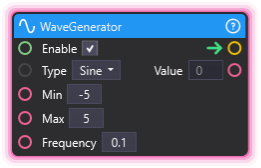
⚙️ Technical Description: Generates continuous oscillating wave patterns (Sine, Sawtooth, Square, Triangle) that update over time based on frequency.
🔍 Full Details & Examples
🔧 How It Works: Continuously generates values that oscillate between min and max following a wave pattern. Frequency controls how fast it oscillates. Different wave types create different motion feels.
✨ Perfect For:
- Pulsing effects (brightness, scale, position)
- Smooth back-and-forth motion
- Breathing or heartbeat animations
- Procedural rhythmic effects
👉 Inputs:
Enable(Boolean) - Turn wave generation on/offType(Dropdown) - Sine, Sawtooth, Square, TriangleMin(Float) - Bottom of wave rangeMax(Float) - Top of wave rangeFrequency(Float) - Speed of oscillation
👈 Outputs:
- (Float) - Current wave value
🎬 Streaming Example: “Use a sine wave (frequency 0.5) to smoothly pulse a donation goal bar’s brightness between 0.5 and 1.0.”
🎯 Tips: Sine is smoothest, Square is abrupt on/off, Sawtooth ramps up then drops, Triangle is linear up and down. Higher frequency = faster oscillation. Must be enabled to update.