File
These 2 nodes let your graphs talk to the file system. Use WriteToFile to log or save data to disk and ReadFromFile to load file contents back in.
WriteToFile
Section titled “WriteToFile”💡 Simple Explanation: Writes text to a file. Saves data to disk.
⚙️ Technical Description: Synchronous node that writes string content to a file at specified path, with options to append or overwrite.
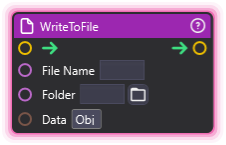
🔍 Full Details & Examples
🔧 How It Works: Writes text content to file path.
✨ Perfect For:
- Logging
- Saving state
- Updating external tools
👉 Inputs:
Folder(String, optional) - Folder path (leave empty for default)File Name(String) - File name to write toData(String) - Text content to write
🎬 Streaming Example: “Save latest donor name to text file for OBS.”
🎯 Tips: Can append to existing files. Creates file if missing.
ReadFromFile
Section titled “ReadFromFile”💡 Simple Explanation: Reads file contents from disk. Load data from files.
⚙️ Technical Description: Synchronous node that reads binary file contents from a specified path and outputs the data as a byte array.
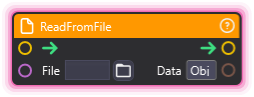
🔍 Full Details & Examples
🔧 How It Works: Reads entire file contents as binary data from the specified path.
✨ Perfect For:
- Loading saved data
- Reading configuration files
- Processing external files
👉 Inputs:
File(String) - Full file path to read
👈 Outputs:
Data(GenericPort) - File contents as byte array
🎬 Streaming Example: “Load custom overlay data from external file.”
🎯 Tips: Use full file paths. Returns raw bytes - convert as needed for text.