Text
Text nodes build and transform strings. Use them to format dynamic messages with variable placeholders, parse values out of API responses, run string operations, or read text files from disk.
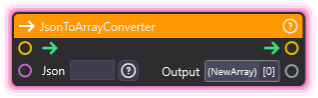
JsonToArrayConverter
Section titled “JsonToArrayConverter”💡 Simple Explanation: Converts JSON text into usable arrays. Parses JSON from APIs.
⚙️ Technical Description: Synchronous node that parses JSON array strings using JArray and converts them to internal array format for use in node graphs.
🔍 Full Details & Examples
🔧 How It Works: Takes JSON array string and converts to internal array format.
✨ Perfect For:
- Processing API responses with arrays
- Parsing JSON data
- Converting external data
👉 Inputs:
json(String) - JSON array string to parse
👈 Outputs:
array(Array) - Parsed array data
🎬 Streaming Example: “Parse JSON list of top donors from API into array for display.”
🎯 Tips: Input must be valid JSON array format.
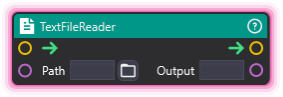
TextFileReader
Section titled “TextFileReader”💡 Simple Explanation: Reads text files from disk. Loads file contents as text.
⚙️ Technical Description: Synchronous node that reads file contents from disk using File.ReadAllText and outputs the text as a string.
🔍 Full Details & Examples
🔧 How It Works: Reads specified file path and outputs contents as string.
✨ Perfect For:
- Loading configuration files
- Reading text data
- External file integration
👉 Inputs:
Path(String) - Path to the file to read
👈 Outputs:
Output(String) - File contents as text
🎬 Streaming Example: “Load custom messages from text file for rotation.”
🎯 Tips: Path must be accessible. Returns full file contents.
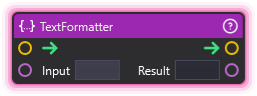
TextFormatter
Section titled “TextFormatter”💡 Simple Explanation: Creates text with variable placeholders. Template engine for dynamic strings.
⚙️ Technical Description: Synchronous node that replaces {variable_name} placeholders in template strings with actual variable values, supporting nested property access and array indexing.
🔍 Full Details & Examples
🔧 How It Works: Replaces {variableName} placeholders with actual variable values.
✨ Perfect For:
- Dynamic text displays
- Data insertion
- Template-based messaging
👉 Inputs:
Input(String) - Text with {placeholders}
👈 Outputs:
Result(String) - Formatted text with values inserted
Syntax: {varName}, {array[0][1]}, {object.property}
🎬 Streaming Example: “Template: ‘Thanks {username} for ${amount}!’ becomes ‘Thanks John for $50!’”
🎯 Tips: Supports arrays and nested properties. Variables must exist.
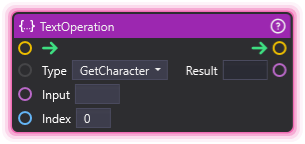
TextOperation
Section titled “TextOperation”💡 Simple Explanation: Manipulates text strings. Provides common string operations.
⚙️ Technical Description: Synchronous node with StringOperation enum that performs various string manipulations including case conversion, insertion, removal, replacement, splitting, joining, and substring operations.
🔍 Full Details & Examples
🔧 How It Works: Performs selected operation on input string.
✨ Perfect For:
- String processing
- Text transformation
- Data manipulation
👉 Inputs:
Input(String) - Text to processType(Dropdown) - Operation to performIndex(Integer) - Position for applicable operations- Additional operation-specific inputs
👈 Outputs:
Result(varies) - Result depends on operation
Operations: GetCharacter, ToLower, ToUpper, Insert, Append, Remove, Replace, Join, Split, SubString, Contains, IndexOf, Length
🎬 Streaming Example: “Convert username to uppercase for display.”
🎯 Tips: Different operations have different input requirements.
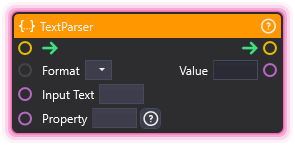
TextParser
Section titled “TextParser”💡 Simple Explanation: Extracts data from structured text. Parses JSON, XML, or uses regex.
⚙️ Technical Description: Synchronous node that extracts data from structured text using JSON/XML parsing or regex pattern matching, with StringDropdownPort for format selection.
🔍 Full Details & Examples
🔧 How It Works: Parses text based on format and extracts specified data.
✨ Perfect For:
- Extracting values from API responses
- JSON/XML parsing
- Pattern matching
👉 Inputs:
Input Text(String) - Text to parseFormat(Dropdown) - JSON, XML, or RegexProperty(String) - Path or pattern to extract
👈 Outputs:
Value(String) - Extracted data
🎬 Streaming Example: “Parse JSON response to extract ‘follower_count’ value.”
🎯 Tips: JSON path like “user.name”. Regex for pattern matching. Essential for API work.