Components
Components are modular pieces of functionality that you attach to scene objects. They control how objects look, move, sound, and behave. Every scene object can have multiple components working together.
What Are Components?
Section titled “What Are Components?”Think of components like attachable superpowers for your scene objects:
- Want an object to fall with gravity? Add a Rigidbody component.
- Want it to play sounds? Add an Audio Player 3D component.
- Want it to shatter into pieces? Add a Mesh Shatter component.
Components can be added, removed, and configured at any time through the Inspector panel.
Adding & Removing Components
Section titled “Adding & Removing Components”To Add a Component:
Section titled “To Add a Component:”- Select a scene object in the Hierarchy or Stage
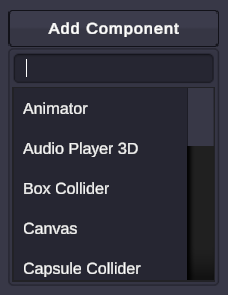
- In the Inspector, click Add Component
- Choose the component from the list
To Remove a Component:
Section titled “To Remove a Component:”- Select the scene object
- Find the component in the Inspector
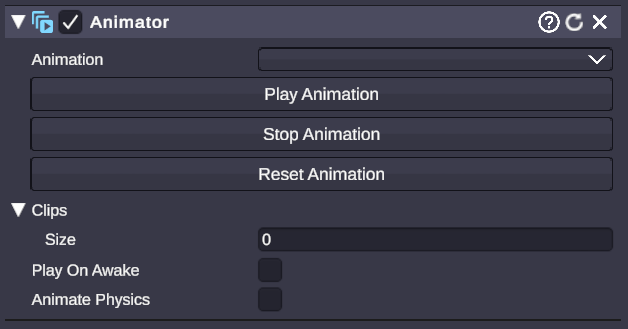
- Click the X button on the component header
Component Categories
Section titled “Component Categories”Control how objects appear visually.
- Object Renderer - Materials and mesh rendering
- Particle Player - Particle effects
- Trail Renderer - Motion trails
- 3D Text - Extruded 3D typography
- Vector Shape - Procedural 2D shapes
- Dynamic Shadow Box - Multi-material 3D boxes
- Sticky Canvas - Camera-following displays
Add realistic physical behaviors.
- Rigidbody - Gravity, mass, and forces
- Box/Sphere/Capsule/Mesh Collider - Collision detection
- Fixed/Hinge/Spring Joint - Connect objects together
Bring objects to life with movement.
- Animator - Play and control animation clips
Add sound to your scenes.
- Audio Player 3D - Spatial audio playback
Special visual and physics effects.
- Mesh Shatter - Destruction and fragmentation
- Soft Body - Jiggly, deformable objects
- Soft Body Collider - Collision for soft bodies
Build user interfaces.
- Canvas - UI container
- Image - Display images
- Text - Display text
- Layout Groups - Arrange UI elements
Controlling Components with Node Graphs
Section titled “Controlling Components with Node Graphs”You can dynamically add, remove, and modify components using node graphs. See the Component Nodes reference for:
ComponentAdd- Add components at runtimeComponentRemove- Remove componentsComponentSetProperty- Change component valuesComponentGetProperty- Read component valuesComponentSetEnable- Enable/disable components
🎯 Start simple - Most objects only need a few components. Add more as needed.
🎯 Check requirements - Some components need others to work. For example, physics joints require a Rigidbody on at least one connected object.
🎯 Performance matters - Components like Rigidbody and colliders use physics calculations. Use them intentionally rather than on every object.